How to Run SQL Against Any Database Engine Through One API
ADO.NET gives every database the same interfaces and still leaves the differences to you. Each engine has its own connection class, identifier quoting, paging syntax and type names, and every method that touches the database has to agree on who opens the connection and who commits the transaction.
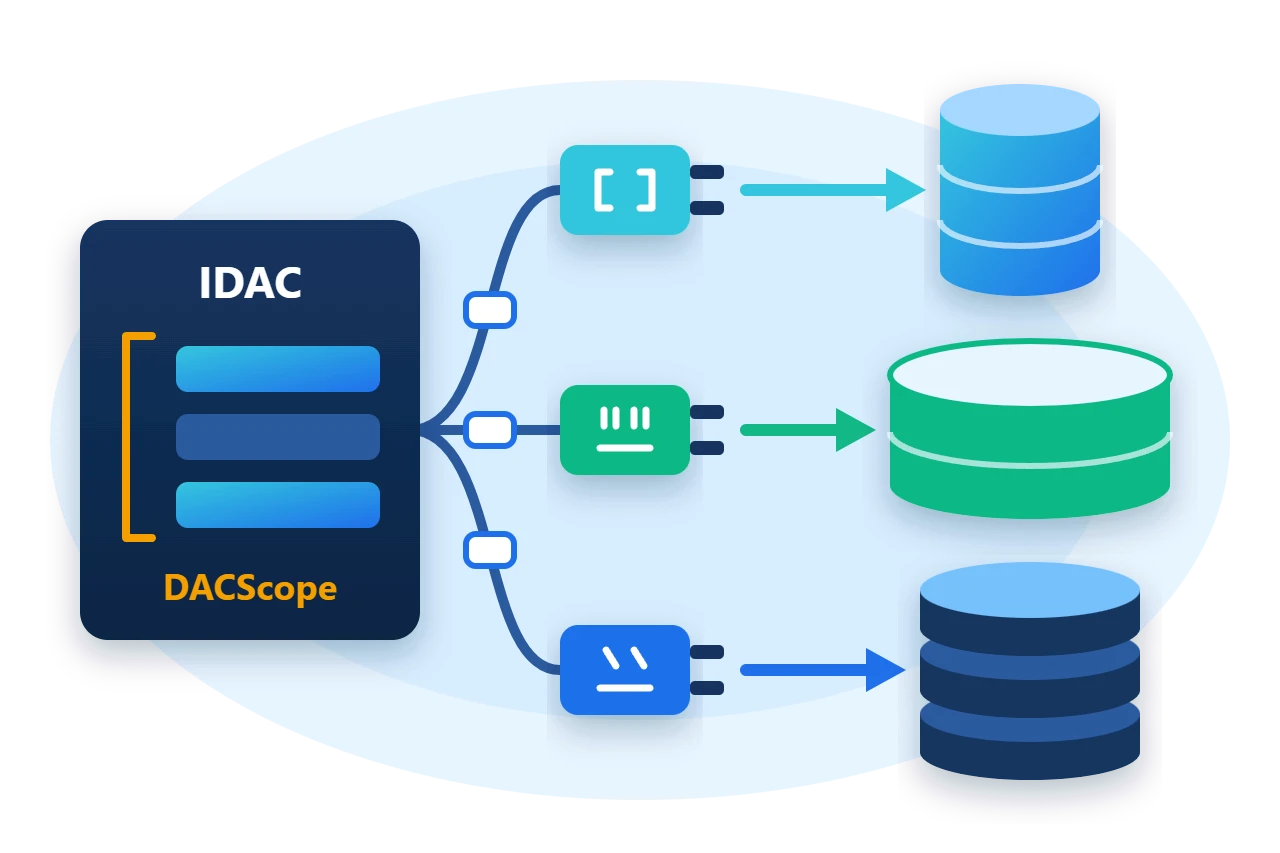
Sphere10.Framework.Data puts one abstraction over those differences. An IDAC executes SQL and simple CRUD for a particular engine, a DACScope owns the connection and transaction for a block of code, and an ISQLBuilder writes the dialect. This article walks through all three against SQLite, using code that does not name SQLite after the first two lines.
1. Create a DAC
DACFactory.CreateDAC builds the DAC for a DBMSType and a connection string. The sample first creates an empty SQLite file with the provider's Tools.Sqlite helper.
Tools.Sqlite.Create(path);
var dac = DACFactory.CreateDAC(DBMSType.Sqlite, Tools.Sqlite.ToConnectionString(path), new NoOpLogger());
From here on the code uses only IDAC. Switching engine means changing the DBMSType and the connection string, provided the provider package is referenced. The factory activates the provider class by name, so a missing package fails at run time and not at compile time.
Tables can be described without writing engine-specific DDL. The builder maps each CLR type to a column type of the target engine.
dac.CreateTable(new TableSpecification {
	Name = "Items",
	Type = TableType.Persistent,
	PrimaryKey = new PrimaryKeySpecification { Columns = new[] { "ID" } },
	Columns = new[] {
		new ColumnSpecification { Name = "ID", Type = typeof(int), Nullable = false },
		new ColumnSpecification { Name = "Name", Type = typeof(string), Nullable = false },
		new ColumnSpecification { Name = "Price", Type = typeof(double), Nullable = true }
	}
});
2. The parts
A DAC, short for data access component, holds a connection string and knows its engine. It is cheap to create and is not disposable, because it opens nothing until a scope asks for a connection.
Each engine has a provider package with its own DAC class and SQL builder. The Framework ships providers for SQLite, SQL Server, MySQL, PostgreSQL, Oracle and Firebird, and application code written against IDAC works with whichever one it is given.
Diagram source
classDiagram
    direction TB
    class IDAC {
      +ExecuteNonQuery(sql)
      +Insert(table, values)
      +CreateSQLBuilder()
      +GetSchema()
    }
    class DACBase {
      +ConnectionString
    }
    class SqliteDAC
    class ISQLBuilder {
      +Select(table)
      +CreateTable(spec)
    }
    IDAC <|.. DACBase
    DACBase <|-- SqliteDAC
    IDAC ..> ISQLBuilder : creates
3. Share a connection and a transaction with a scope
Every DAC call runs inside a DACScope. A call made on its own opens a scope, runs and closes it. Wrapping several calls in EnterScope() makes them share one connection, and BeginTransaction() on that scope makes them one unit of work.
using (var scope = dac.EnterScope()) {
	scope.BeginTransaction();
	dac.Insert("Items", new[] { new ColumnValue("ID", 1), new ColumnValue("Name", "First"), new ColumnValue("Price", 10.5) });
	dac.Insert("Items", new[] { new ColumnValue("ID", 2), new ColumnValue("Name", "Second"), new ColumnValue("Price", 20.0) });
	dac.Insert("Items", new[] { new ColumnValue("ID", 3), new ColumnValue("Name", "Third"), new ColumnValue("Price", 30.0) });
	scope.Commit();
}
The Insert calls take no connection or transaction argument. The scope is ambient, so any method called inside the using block joins it, however deep in the call chain it is.
A scope that is disposed without Commit() does not commit. The sample shows this with an explicit rollback, after reading its own pending row.
Diagram source
---
config:
  sequence:
    actorMargin: 8
    width: 96
    mirrorActors: false
    messageMargin: 28
    noteMargin: 8
---
sequenceDiagram
    participant C as Code
    participant S as DACScope
    participant D as Database
    C->>S: EnterScope()
    S->>D: open connection
    C->>S: BeginTransaction()
    C->>D: Insert, Update
    C->>S: Commit or Rollback
    S->>D: end transaction
    Note over S: dispose closes it
using (var scope = dac.EnterScope()) {
	scope.BeginTransaction();
	dac.Insert("Items", new[] { new ColumnValue("ID", 4), new ColumnValue("Name", "Discarded"), new ColumnValue("Price", 40.0) });
	Require(dac.Count("Items") == 4, "The scope did not see its own pending insert.");
	scope.Rollback();
}
Require(dac.Count("Items") == 3, "Rollback left the insert behind.");
Nested scopes join the outer one. A nested Commit() does not commit on its own, and a nested Rollback() makes the outer commit roll back. They are shared transactions and not savepoints.
4. Query and change rows
The CRUD helpers build their SQL through the engine's builder.
dac.Update("Items", new[] { new ColumnValue("Price", 25.0) }, new[] { new ColumnValue("ID", 2) });
dac.Delete("Items", new[] { new ColumnValue("ID", 3) });

var page = dac.Select("Items", columns: new[] { "ID", "Name", "Price" }, limit: 2, offset: 0, orderByClause: "Name ASC");
Select returns a DataTable. Its limit and offset arguments become whatever paging syntax the engine uses, such as LIMIT on SQLite and TOP or a ROW_NUMBER() query on SQL Server. Count, Any, ExecuteQuery and ExecuteScalar<T> cover the other common reads.
To see the dialect, ask the DAC for its builder and print what it writes.
var builder = dac.CreateSQLBuilder();
builder.Select("Items", columns: new object[] { "ID", "Name" }, limit: 10, orderByClause: "Name ASC");
On SQLite this produces SELECT [ID], [Name] FROM [Items] ORDER BY Name ASC LIMIT 10.
5. Bind parameters for untrusted values
ColumnValue values and the arguments of ExecuteQuery(sql, args) are formatted into the SQL text as literals. They are not bound parameters. Use them for values your code controls, and bind anything that comes from a user.
For a bound value, create an ordinary ADO.NET command from the scope's connection.
using (var scope = dac.EnterScope()) {
	using var command = scope.Connection.CreateCommand();
	command.CommandText = "SELECT Name FROM Items WHERE Price > @minimum";
	var parameter = command.CreateParameter();
	parameter.ParameterName = "@minimum";
	parameter.DbType = DbType.Double;
	parameter.Value = 20.0;
	command.Parameters.Add(parameter);
	Require((string)command.ExecuteScalar() == "Second", "The bound parameter query returned the wrong row.");
}
The scope still owns the connection. Its Connection object refuses Close, Dispose and BeginTransaction, so a helper cannot end a unit of work that belongs to its caller.
6. Read the schema
GetSchema() returns a normalized model of tables, columns and keys from the engine's own metadata.
var table = dac.GetSchema().Tables.Single(item => item.Name == "Items");
Require(table.PrimaryKey.ColumnNames.Single() == "ID" && table.Columns.Length == 3, "Schema differs from the created table.");
It reads the metadata on every call. GetSchemaCached() keeps the result for a connection string, and InvalidateCachedSchema() discards it after a schema change.
7. Limits
-
The API is synchronous. The asynchronous extension methods run the synchronous call on a worker thread and do not use driver-level asynchronous I/O.
-
A scope's connection serves one command at a time. Give concurrent work separate scopes.
-
Engines differ in what they support.
BulkInsertworks only with SQL Server, and builders differ in sequences, variables and DDL, so test on each engine you target. -
Multi-statement scripts built with a builder go through
ExecuteBatch, which splits and sends them the way each engine requires.
8. Get the package and run the sample
Reference the core data package and the provider for each engine you use.
dotnet add package Sphere10.Framework --version 3.1.3
dotnet add package Sphere10.Framework.Data --version 3.1.3
dotnet add package Sphere10.Framework.Data.Sqlite --version 3.1.3
The complete MIT-licensed sample contains the code shown above.
dotnet run -c Release -- ./fresh-data
Committed rows: 3; rolled-back insert discarded
Page: First=10.5, Second=25
SqliteSQLBuilder: SELECT [ID], [Name] FROM [Items] ORDER BY Name ASC LIMIT 10
Schema: Items(ID, Name, Price), primary key ID
DAC checks: passed
The
data access guide
documents every IDAC member, the scope rules and the builders, and the
SQLite provider guide
covers that engine's helpers.
The Sphere10 Framework overview describes the rest of the toolkit.
Author: Herman Schoenfeld
