Desktop Services
.NET Applications
Sphere 10 builds .NET applications for the work that defines your business: managing records, coordinating people, processing data and connecting existing systems. We deliver desktop tools, web applications, background services and integrated operational software using C# and an architecture matched to the job. The scope includes the application, its data and the controls needed to run it every day, with clear ownership of business rules and external dependencies.
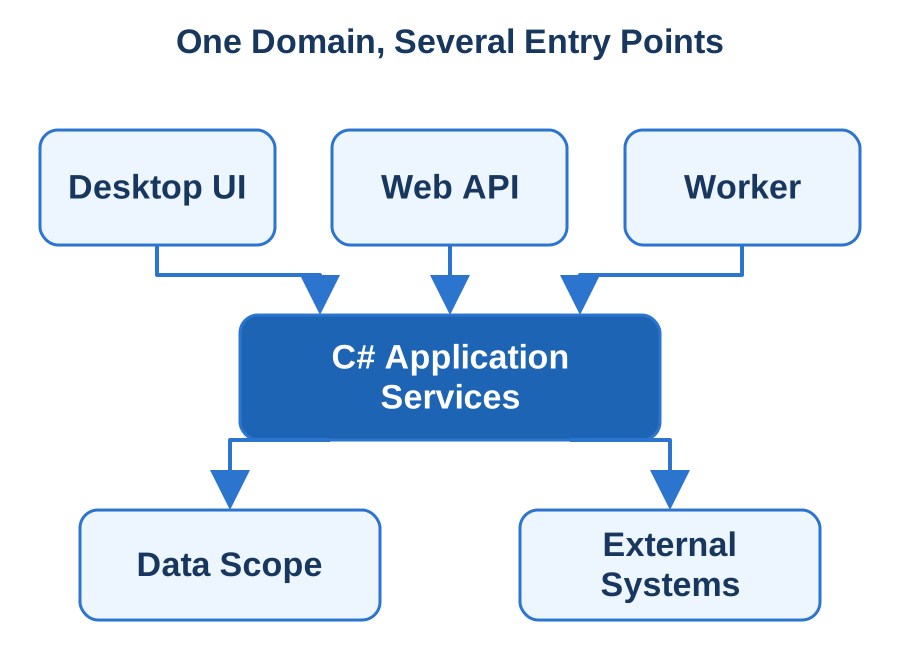
A quoting workstation, an import service and a customer portal may use the same domain logic while presenting very different interfaces. We design those boundaries deliberately. Our own Sphere10 Framework provides reusable application, data-access, collection, serialisation and diagnostic foundations. Local Notion demonstrates our .NET product engineering across content synchronisation and publication. We bring that engineering depth to your application, shaping a maintainable system around its actual workflows, performance needs and deployment environment.
Model the Work and Its Business Rules
We turn existing spreadsheets, manual procedures and system interfaces into an explicit domain model. Records have identities, permitted transitions and validation rules. Users have defined responsibilities. Acceptance examples show what should happen for ordinary work, corrections and exceptions, giving the implementation a concrete definition of completion.
We implement C# application services behind ASP.NET Core HTTP APIs, Generic Host worker services or desktop commands. WinForms and WPF serve Windows workstations; MAUI supplies native mobile and supported desktop targets when those interfaces fit. Domain operations remain independent of their invoking screen or scheduler, so the same validation and transaction rules can support several entry points without duplicating business logic.
Build on Reusable Foundations With Clear Ownership
Sphere10 Framework supplies application composition and lifecycle mechanisms, typed data-source contracts and provider-specific data infrastructure. We use appropriate components to reduce repeated plumbing while keeping your domain model and business decisions in your application. Dependencies are chosen for the actual runtime, platform and deployment requirements.
SQL Server supports shared relational workloads, while SQLite suits embedded records and local state. We choose EF Core, NHibernate or an existing data layer around the schema and application lifecycle, then implement migrations, concurrency checks and operation-sized transactions. Sphere10 Framework contributes application composition, persistence, serialisation and logging mechanisms selected for the target. OpenAPI or gRPC/Protocol Buffers define service boundaries where independently deployed components need them.
Engineer Responsiveness and the Unhappy Paths
Long-running work needs progress, cancellation and a clear account of completed and rejected items. We keep expensive operations off the UI thread and bound concurrent processing. Large record sets receive appropriate paging, queries and refresh behaviour. Performance work begins with representative data and an observed bottleneck.
Cancellation, asynchronous I/O and bounded background work keep interfaces and request handlers responsive. We test stale updates, denied access, partial imports and failures after a committed change. An external operation receives a stable identity and a recorded completion state so retries can reconcile uncertain results. Logs carry correlation context, while backup and restoration exercises verify the records and settings the application actually needs.
Deliver Source, Deployment and Operating Knowledge
You receive a buildable solution, dependency inventory, database changes and deployment instructions for the agreed environment. Configuration separates secrets and site-specific values from binaries. The release process identifies prerequisites, application data locations and the steps that produce a repeatable package.
We publish against explicit target frameworks and runtime identifiers, choosing framework-dependent or self-contained delivery around the deployment environment. Native libraries, configuration, secrets and service permissions are part of the artifact contract. Acceptance follows complete business workflows through their stored and integrated outcomes. Source, dependency versions, migration steps and recovery procedures make the resulting Windows or Linux service, API or desktop release reproducible.
Technologies & Integration
Discuss Your Project Back to Services
Blazor Hybrid Development
Sphere 10 builds Blazor Hybrid applications for teams that want Razor-based interfaces inside an installed desktop or mobile product. We develop operational workstations, device-connected tools and business applications that combine C# presentation logic with local files, native capabilities and dependable backend services. The shared interface can draw on web skills while the application is packaged, installed and operated as a native host on its agreed platforms.
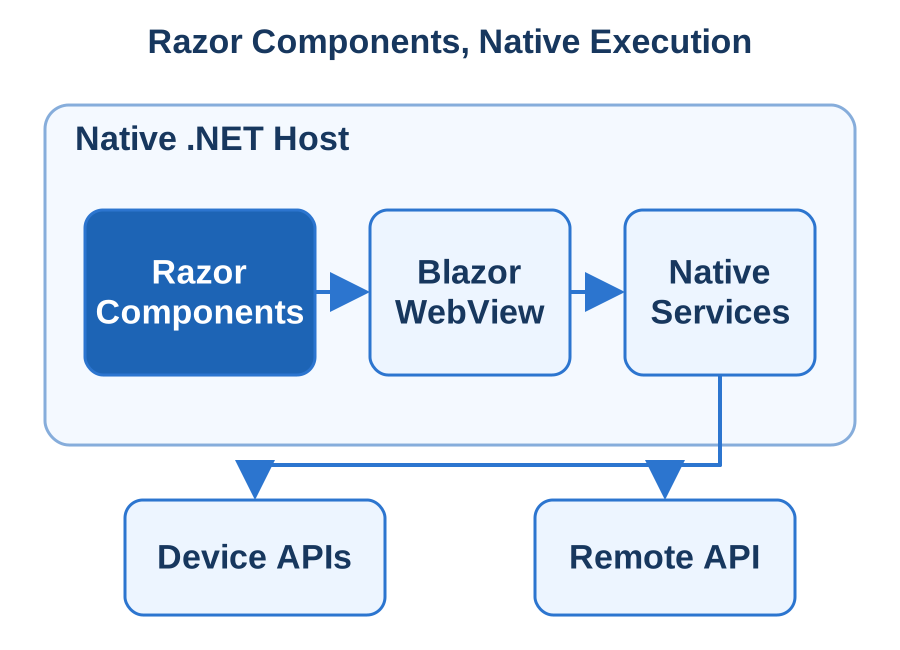
BlazorWebView runs Razor components in the native .NET process and renders their interface through an embedded WebView. We use that architecture deliberately: shared components handle presentation, application services own the work and platform adapters provide device access. A MAUI host can target supported mobile and desktop platforms; WinForms or WPF hosts suit Windows integration. We assess component compatibility, authentication, offline needs and deployment dependencies early, then deliver the complete installed experience with repeatable builds and a practical support model.
Reuse Components Around an Explicit Host
We identify the interface components that can be shared and the interactions that should remain native. A reporting workspace, record editor or guided workflow may reuse Razor presentation while file picking, printing and notifications use host services. Navigation and application state are designed for installation, not assumed from a browser session.
A .NET MAUI Blazor Hybrid application hosts Razor components in BlazorWebView; WPF and WinForms can also host BlazorWebView on Windows. Component code executes in native .NET while the embedded browser renders the DOM. We test CSS, JavaScript interop and third-party components against the actual host engines, including WebView2 on Windows, and document installation prerequisites before extending the shared interface.
Give Components Application Services to Call
Razor components call typed application operations rather than owning persistence or device permissions. Dependency injection supplies platform implementations for storage, printing and other native functions. This keeps the shared interface understandable and lets the same operation be exercised independently of its visual control.
Razor Class Libraries hold reusable components and application-facing interfaces. Host implementations supply file access, credentials, device capabilities and lifecycle services through dependency injection. Compatible Sphere10 Framework contracts, data and diagnostic components can support that composition. Its current Interactive Server Blazor adapter has a separate server execution model; we implement the Hybrid host and service lifetimes explicitly for the installed application.
Make Local Work and Updates Predictable
An installed client can retain local records and drafts, but their meaning must be explicit. We distinguish pending edits, synchronised information and authoritative server state. APIs carry stable identifiers and compatibility rules so a client can recover after losing a response or reconnect after a period offline.
Local SQLite records, native credential storage and versioned ASP.NET Core APIs support work that must survive interrupted connectivity. We test termination, token expiry, failed transfers and upgrades over existing data, then exercise focus, keyboard input, text scaling and printing in the packaged host. Reuse decisions follow observed component behaviour on each platform and include the native adapters and JavaScript dependencies those components require.
Ship the Native Projects and the Reuse Map
Delivery includes the native host projects, shared component libraries, service implementations and backend changes. Build instructions identify SDKs, workloads, WebView prerequisites and signing responsibilities. We document which components are shared with any web application and which belong solely to the installed client.
Delivery includes the MAUI or Windows host projects, Razor libraries, platform prerequisites and release configuration. The reuse map identifies portable components, host services and platform-specific integrations. Acceptance follows installation, authentication, record editing and a native capability through the resulting business record. Upgrade and diagnostic procedures give your team an operational baseline for extending shared components without losing track of each installed host.
Technologies & Integration
Discuss Your Project Back to Services
MAUI Development
Sphere 10 develops .NET MAUI applications for connected business workflows on Android, iOS, Windows and macOS through Mac Catalyst. We build field tools, account applications, inspections and operational interfaces that benefit from a shared C# codebase and native platform controls. The application includes its screens, device integrations, local records and supporting services, with the platform differences made explicit in the design.
We start with the work people must complete and the hardware they will use. A barcode scan, photograph, Bluetooth exchange or offline form can determine the architecture more than the number of screens. MAUI provides shared UI and platform integration mechanisms; our .NET application engineering provides the domain rules, data contracts and backend. We combine those parts into a tested device experience, with clear synchronisation states, predictable resumption and a repeatable release process for each agreed target.
Build Native Screens Around Shared State
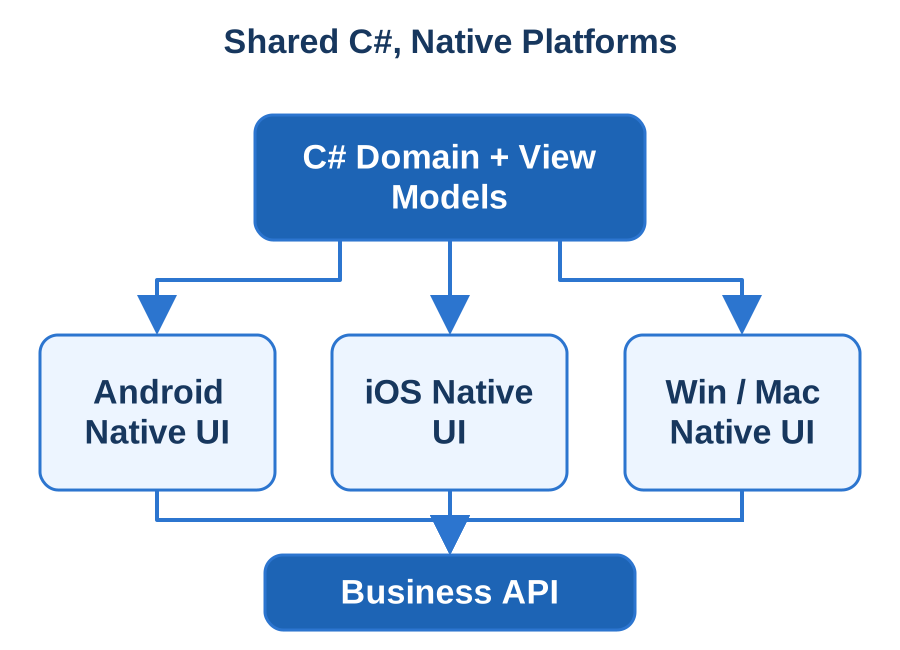
We use C# and XAML to describe task-focused screens, with view models and application services keeping validation and long-running work separate from presentation events. Navigation state represents the user's work, so an interrupted form or detail view can be restored deliberately when the application resumes.
MAUI combines C#, XAML and MVVM-style presentation with handlers that map shared controls to native platform views. We build Android and iOS workflows, Windows WinUI 3 applications and macOS applications through Mac Catalyst against an agreed device matrix. Platform code handles interactions such as camera access, secure credentials or Bluetooth where required. A Linux desktop target receives a suitable UI implementation, such as Avalonia, alongside the shared domain.
Share the Domain and Connect the Backend
ASP.NET Core services own shared records, authorisation and integration with business systems. The client calls those services through versioned contracts with cancellation and explicit error results. Local storage preserves drafts and the reference information needed for the agreed offline workflow, while the server remains authoritative for committed business state.
Shared C# application services own business rules and call versioned ASP.NET Core APIs. SQLite stores local work with explicit migrations and reconciliation; platform adapters own permission checks and native device access. Sphere10 Framework supplies compatible serialisation, data, settings and application foundations. Its Windows Forms controls keep their Windows target, while the MAUI interface uses MAUI controls, handlers and native platform APIs.
Design for Interruptions and Conflicting Work
Mobile operating systems can suspend or terminate an application while the user is working. We persist the state needed to resume safely and reconcile submissions whose responses were lost. Uploads, permissions and pending operations receive visible progress and recovery choices rather than an unexplained spinner.
We exercise native permission changes, missing accessories, reconnecting clients and concurrent edits on representative devices. Android scheduled work and iOS background opportunities receive platform-specific designs; pending operations remain visible when execution is deferred. Upgrade tests cover SQLite migrations, credential retention and old-client/new-server compatibility. Handlers and event subscriptions are released with their owning view so repeated navigation does not accumulate native resources.
Deliver Each Target as a Reproducible Product
You receive the MAUI project, platform configuration, backend changes and a dependency inventory with build instructions. We identify the workloads, signing identities and distribution accounts required for each platform. Store submission, enterprise distribution and device installation are prepared according to the agreed delivery route.
Each target receives its native build, signing and distribution configuration: Android packages, Apple provisioning and the chosen Windows delivery format. We record MAUI workloads, SDK dependencies and supported runtime combinations with the release. Acceptance follows the complete device workflow and final business-system result. The handover explains shared application logic, platform adapters, configuration and diagnostics so the native behaviour can evolve alongside the common C# code.
Technologies & Integration
Discuss Your Project Back to Services
Multi-Language Codebases
Sphere 10 integrates C#, C++ and Rust into applications where different parts of the system have different responsibilities. We connect existing device SDKs, preserve valuable native libraries, expose specialist processing to .NET applications and separate fault-sensitive work into controlled processes. The objective is a system whose language boundaries are deliberate, testable and understandable to the team that maintains it.
A C# application may coordinate users, records and services while a native component handles a hardware protocol or a specialised computation. That division needs more than a successful function call. Data layouts, string encodings, buffer ownership, callbacks, cancellation and error handling all form part of the contract. We engineer those mechanics alongside the build and deployment process, then test the boundary with realistic workloads and adverse inputs. Your application receives the wrappers, diagnostics and documentation needed to evolve both sides confidently.
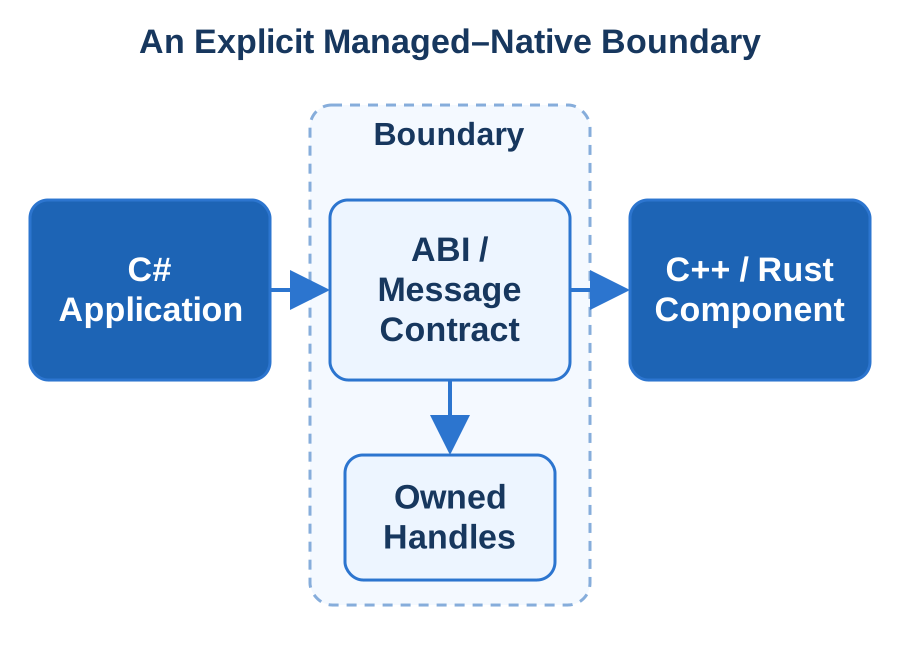
Give Each Language a Specific Responsibility
We assess the existing code, dependencies and operational requirements before moving work between languages. C# often suits application orchestration and business services; C++ may own an established device SDK or native subsystem; Rust may suit a component with explicit memory and concurrency requirements. The selection follows the task and its measured constraints.
We combine C# or F# application code with C/C++ or Rust libraries, Python workers, and Swift or Kotlin platform modules when each language has a defined responsibility. A C ABI suits tightly coupled native calls with known memory ownership. A separate worker using gRPC/Protocol Buffers or a versioned message protocol supplies a stronger failure boundary for crash-prone or independently deployed components, with startup, health and shutdown designed together.
Make Memory and Data Exchange Explicit
A C ABI is a useful interoperation surface for managed and native components. We define fixed-width values, structures, lengths and string encoding deliberately. LibraryImport or appropriate P/Invoke declarations connect .NET to that surface. SafeHandle and explicit release functions express ownership of native resources across the boundary.
For .NET-to-native calls we define exported C entry points, structure layout, UTF-8 encoding, buffer lengths, calling conventions and allocator ownership. LibraryImport/P/Invoke wrappers keep these rules in one place; callbacks remain rooted until the native side releases them. Sphere10 Framework provides applicable communication mechanisms such as pipes, TCP and JSON-RPC. Each integration still receives its own versioned wire contract, cancellation rules and disposal sequence.
Test Beyond a Successful Function Call
Boundary tests cover empty input, maximum lengths, malformed data, invalid handles and repeated allocation/release cycles. We compare results with native fixtures and exercise concurrent calls where supported. Cancellation and shutdown are tested while work is active, including callbacks arriving during teardown.
Contract tests exchange known payloads across both implementations and cover malformed lengths, error codes and callback shutdown races. Measurements separate native computation from copying, marshalling and call frequency before we introduce batching. Worker-based tests additionally cover truncated messages, restart and uncertain completion. Correlation identifiers distinguish a failed transport from an operation that completed before the response was lost.
Deliver One Reproducible Mixed-Language System
We retain the native build tools appropriate to each component, such as CMake or Cargo, and coordinate them with the .NET build. The release records compiler settings, dependency versions and architecture-specific binaries. Packaging includes the libraries and runtime assets the installed application actually needs.
The build records the .NET target framework, CMake or native toolchain, Rust target and required runtime libraries for every supported architecture. Handover includes wrapper source, headers or protocol definitions, dependency licenses and compatibility tests. Your team receives a failure-isolation and ownership map so a component upgrade can be checked at its actual boundary without spreading native memory or interpreter assumptions through the application.
Technologies & Integration
Discuss Your Project Back to Services
Cross-Platform Solutions
Sphere 10 develops cross-platform applications with a shared business core and deliberate platform boundaries. We build desktop products, background services and connected clients that must operate across an agreed set of systems. The scope includes more than compilation: installation, file handling, device integration, updates and support all need a coherent answer on each target. We design the shared parts and platform-specific parts together.
C# and .NET provide a strong foundation for portable domain logic, data processing and services. Avalonia can provide a shared desktop interface, while native adapters handle the interactions that differ. Our Local Notion product demonstrates .NET command-line distribution across Windows, Linux and macOS. We apply the same attention to runtime dependencies and operational detail to your product, with a clear capability matrix and acceptance evidence for every platform you intend to support.
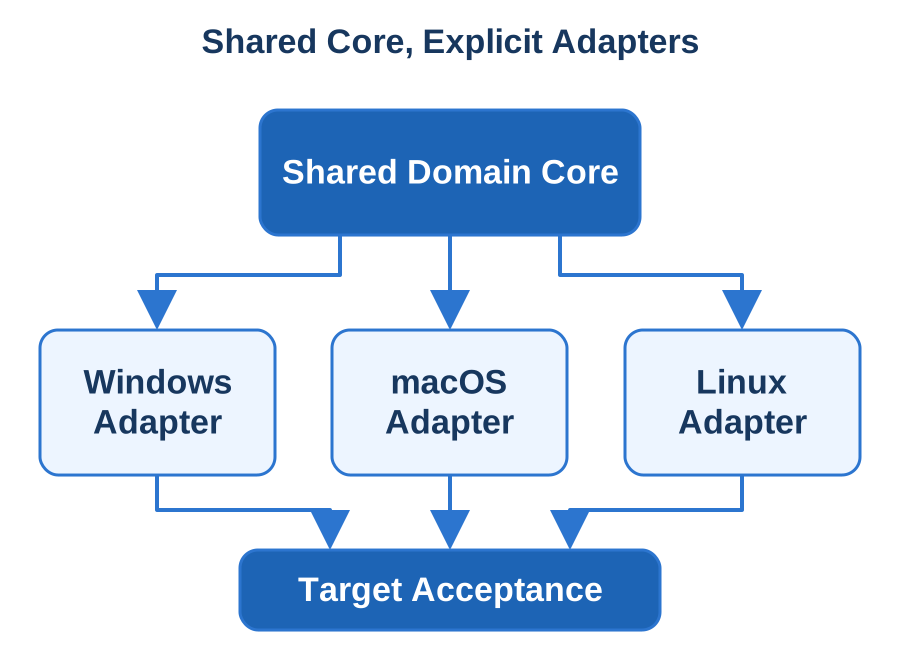
Draw the Portability Boundary Around the Domain
We separate business rules, data contracts and calculations from filesystems, user interfaces and operating-system services. A shared application operation can then be called by different hosts without duplicating its policy. Platform adapters provide the capabilities needed by the selected runtime, with explicit alternatives where behaviour differs.
We select the presentation stack from the supported targets: Avalonia for a C# Windows/macOS/Linux desktop, MAUI for its supported mobile and desktop families, and TypeScript or Blazor for browser delivery. The portability audit then checks case-sensitive paths, permissions, locales, time zones, native libraries and hardware APIs. Shared domain rules remain independent of these adapters, allowing useful existing code to survive a platform expansion.
Choose the Right Host and Shared Libraries
A headless .NET service, an Avalonia desktop client and a mobile application can share suitable business components while using different presentation and lifecycle code. We select the host around the required interactions, deployment environment and maintenance needs. Common code is useful when its responsibilities and dependencies are understood.
ASP.NET Core services and Generic Host workers can share application contracts across Windows and Linux deployments. Native dependencies and NuGet assets are selected through explicit target frameworks and runtime identifiers. We choose portable Sphere10 Framework libraries and platform adapters individually. Local Notion's CLI processing separated from Windows-only UI dependencies illustrates the same boundary between reusable work and a particular desktop host.
Verify Real Operating-System Differences
We exercise file access, network failures, credentials and data conversion on clean target machines. A successful run in a developer shell does not establish the installed user's environment. Application data locations, proxy settings, executable permissions and shutdown signals are tested as part of the product workflow.
Acceptance uses the actual operating-system and CPU combinations, including Apple Silicon or Linux ARM64 where required. We exercise file and permission behaviour, native-library loading, upgrades and representative complete tasks. A self-contained package still needs compatible native assets; a framework-dependent package also needs an appropriate installed runtime. Startup and resource measurements use the distribution artifact when those packaging choices materially affect the product.
Deliver a Maintained Platform Matrix
Delivery includes the shared source, platform projects, build automation and packages for the agreed runtime identifiers. We record required system libraries, configuration and distribution responsibilities. Signing, installation and update procedures are defined for each target instead of being hidden behind a single build command.
Delivery includes a maintained target matrix, dependency map and platform test suite. Native capability adapters document supported behaviour and deliberate fallbacks, while packaging scripts capture runtime and architecture choices. Your team can check a dependency upgrade against those boundaries and reproduce each release. New platforms then become a defined implementation and acceptance effort against a shared application model.
Technologies & Integration
Discuss Your Project Back to Services
Windows, macOS & Linux
Sphere 10 develops and delivers applications for Windows, macOS and Linux with attention to the differences users encounter every day. We build desktop interfaces, command-line tools and background processes, and port existing .NET software to agreed targets. Installation, file access, system integration, updates and recovery are part of the application, with a clear platform and processor-architecture matrix from the beginning.
A shared C# core can provide consistent business behaviour while native adapters handle the operating environment. Avalonia can supply a common desktop interface; headless tools may need only a .NET runtime and their own dependencies. Our Local Notion product demonstrates platform-specific command-line distributions and retained local content. We bring that practical view to your application: identify the supported environment, package the right assets, test from a clean user account and document how the installed product is maintained.
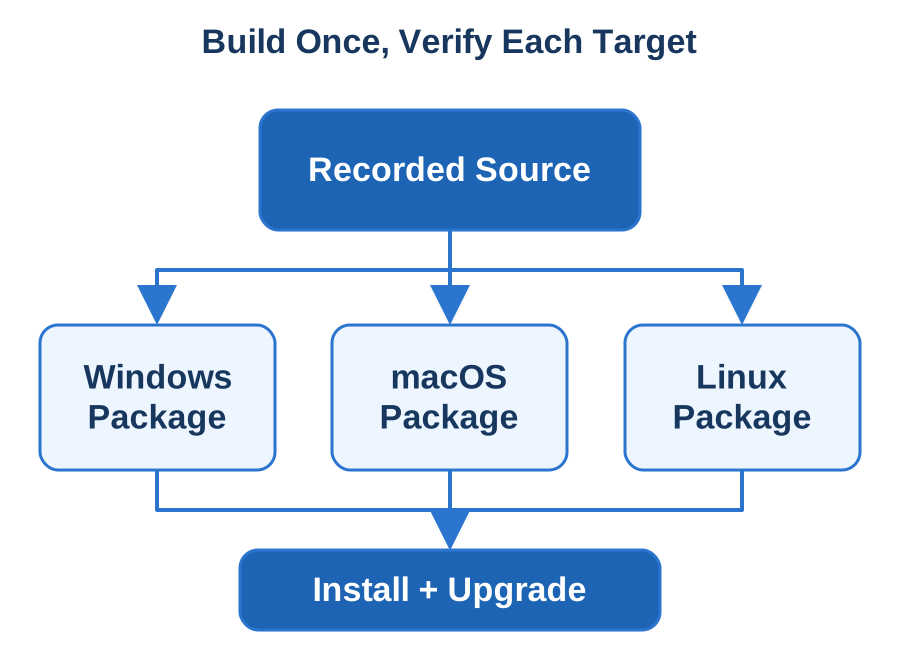
Match the Desktop Experience to the Product
We identify the interface, integration and deployment requirements for each operating system. A record-management workstation may benefit from a shared Avalonia interface; a scheduled data processor may be a service or command-line tool. Existing Windows Forms and WPF screens can be retained for Windows while a separate migration is scoped where required.
Avalonia supplies a shared C# desktop interface for Windows, macOS and Linux when the product needs all three. WinForms or WPF remains an effective Windows-specific choice for an established workstation application. We implement platform adapters for file dialogs, URLs, notifications, tray menus, shortcuts and device access, documenting the behaviour and fallback each target actually supports. Shared application services keep business rules consistent across those hosts.
Package the Runtime and Platform Assets Deliberately
.NET publishing offers different ways to supply the runtime and application files. We select the mode around installation size, maintenance, startup and dependency requirements. Native libraries, configuration templates and content assets are included intentionally, with a package inventory that explains what the application loads.
We publish explicit .NET runtime/architecture variants and include the native libraries required by each build. Windows distribution can use MSIX or an appropriate installer; direct macOS distribution receives Developer ID signing and notarisation; Linux can use a Flatpak runtime and declared sandbox permissions. Local Notion's platform archives, installation helpers and retained user content provide a concrete reference for separating program files from the records a user owns.
Verify the Operating-System Edges
We test installation and launch on clean target environments, including ordinary-user permissions and missing prerequisites. File paths, case sensitivity, locale, time zones and system certificates receive explicit attention. A backend or network failure should produce a useful application result and diagnostic context on each platform.
Tests cover file-name casing, user-directory permissions, display scaling, keyboard conventions and x64/ARM64 dependencies in the agreed platform matrix. An update must close or preserve unfinished work, migrate existing configuration and restart predictably. We measure startup and resource use from the actual distribution package when relevant. macOS Gatekeeper behaviour and Linux sandbox access are checked using the signed or packaged artifact delivered to users.
Hand Over a Practical Platform Support Model
Delivery includes the application source, build instructions and target-specific packages with checksums and dependency records. We document how to reproduce the release, configure the installation and identify its version. Support notes explain the relevant log locations, permission checks and platform-specific failure paths.
Handover provides source, platform adapters, package scripts and a tested installation/support matrix. The release record identifies target framework, runtime identifier, native dependencies and signing ownership. Complete user tasks establish acceptance on each selected system, including upgrade and recovery over existing data. Future dependencies and OS changes can then be assessed against explicit application boundaries and reproducible packages.
Technologies & Integration
Discuss Your Project Back to Services
WinForms, WPF and Avalonia UI
Sphere 10 builds and modernises desktop interfaces for people who spend their working day in an application. We develop record-heavy workstations, administration tools, specialist editors and device-connected software using WinForms, WPF or Avalonia according to the product's needs. The interface is designed around productive tasks: finding records, making accurate changes, navigating quickly and understanding what the system has done.
Our .NET focus includes a substantial Sphere10 Framework WinForms library with typed data-source integration, CRUD controls, validation, reference editing and application infrastructure. We combine that experience with an appropriate presentation architecture for the chosen toolkit. Existing working screens can be improved incrementally, while new interfaces can share application services and domain rules. Our AutoMouse product also provides a concrete reference for native input integration, remembered preferences and desktop operation across real workstation environments.
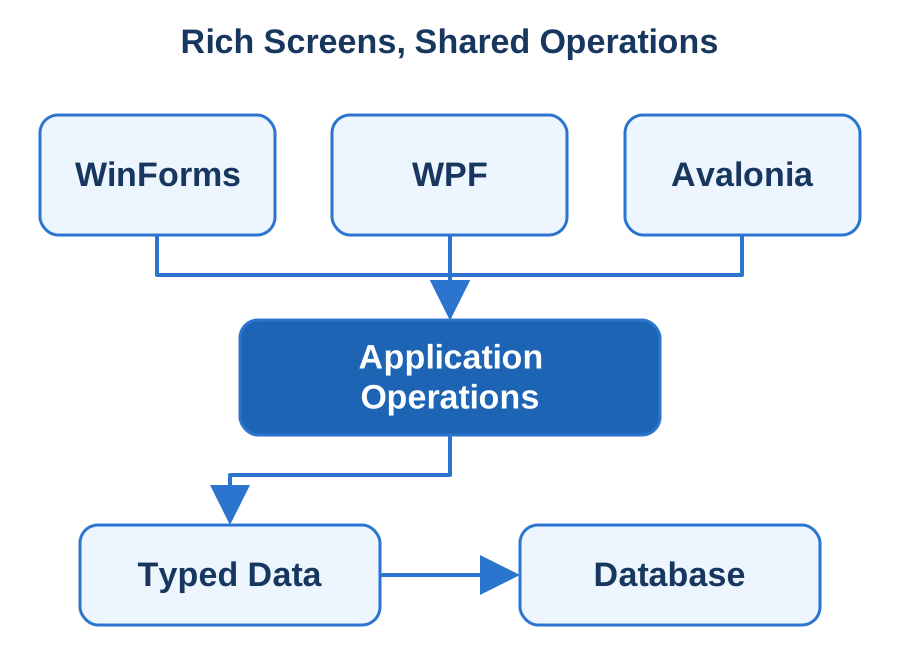
Choose the Interface Strategy Screen by Screen
WinForms suits established Windows applications and data-entry workstations with mature controls. WPF provides a Windows presentation model with XAML, binding and composable visual structure. Avalonia supports shared interfaces across its documented target platforms. We choose the approach around required controls, integration, accessibility and the cost of maintaining the product.
WinForms suits event-driven Windows operator tools and designer-based controls; WPF supplies XAML, binding, templating and MVVM-friendly presentation for Windows; Avalonia brings a XAML/C# model to an agreed cross-desktop target matrix. Modernisation starts with useful existing workflows and their application contracts. We migrate screens incrementally, retaining productive behaviour while separating data access and platform dependencies from UI event handlers.
Connect Rich Controls to Clear Application Contracts
Sphere10 Framework 's WinForms infrastructure includes CrudGrid, reference editors, validation and typed IDataSource contracts. Those mechanisms separate record operations from grid presentation and provide reusable building blocks for data-heavy Windows software. The application still owns its domain rules, permissions and transaction boundaries.
Sphere10 Framework's WinForms CrudGrid and CRUD editors support Windows data-entry workflows. For WPF or Avalonia we compose the appropriate controls and view models around compatible application operations. Queries receive deliberate paging and filtering, changes return actionable validation, and refresh preserves useful selection. Device integrations and modal workflows sit behind interfaces so control-specific behaviour does not become the owner of business transactions.
Keep the Interface Responsive During Real Work
Expensive reads, calculations and exports need progress and cancellation without blocking the UI thread. We design the ownership of background tasks and subscriptions so closing a screen releases its work safely. Error results explain whether an operation failed before or after a change was committed.
WinForms controls, WPF Dispatcher objects and Avalonia UI objects have UI-thread ownership rules. We keep database or network work asynchronous, marshal presentation updates to the correct dispatcher and cancel work when a view is closed or superseded. Acceptance includes stale records, unsaved edits, large result sets, keyboard-only use, high-DPI displays and multiple monitors on the supported workstations, with subscriptions and native resources released correctly.
Deliver a Maintainable Desktop Experience
You receive the interface projects, shared application components, build configuration and deployment instructions. We document toolkit-specific dependencies alongside reused infrastructure, with a screen and service map that makes ownership clear. Configuration and user preferences are kept separate from the application package.
Delivery includes the desktop project, control dependencies, application-service contracts and reproducible package configuration. We verify an upgrade with existing settings and a complete operator workflow through its final data result. The handover documents dispatcher boundaries, refresh/cancellation behaviour and diagnostic procedures. That gives maintainers a concrete basis for extending a WinForms screen, introducing WPF views or supporting an Avalonia desktop without rediscovering its lifecycle assumptions.
Technologies & Integration
Discuss Your Project Back to Services
App Store Packaging & Publishing
Sphere 10 prepares applications for repeatable distribution through stores, managed enterprise channels and direct installation. We take the working source through package configuration, signing, acceptance builds and release materials, with clear ownership of application identity and publisher accounts. The deliverable includes the mechanics that make installation, upgrades and support dependable for the people receiving the application.
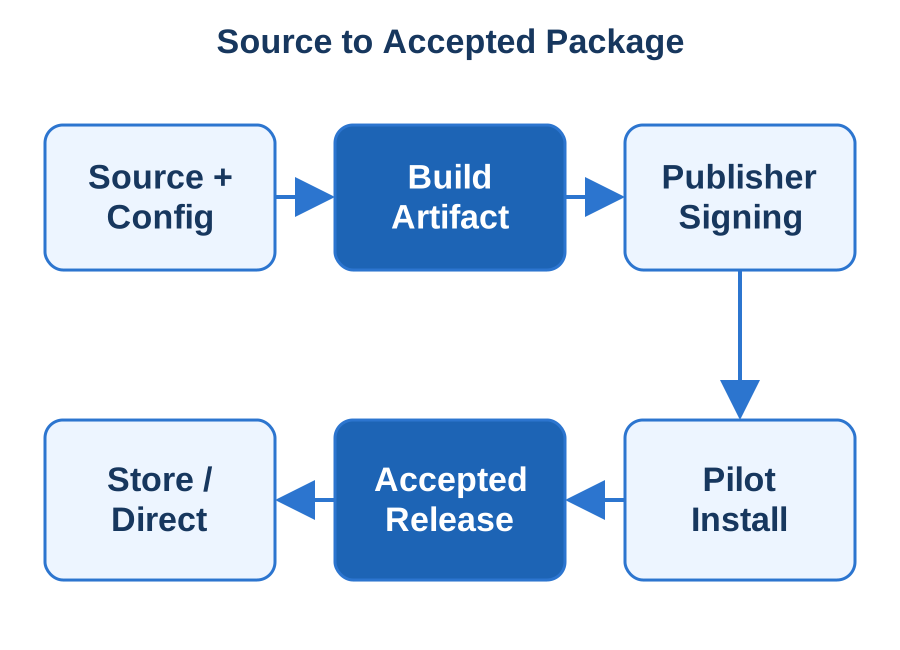
Windows packages, Apple submissions and Android App Bundles have different requirements. We identify the target channel early, then align the build, dependencies, permission declarations and update model with it. Our .NET product work, including AutoMouse and Local Notion , gives us practical experience with packaged runtime choices, local content and platform-specific distributions. We apply that discipline to your release: establish the exact artifact, test it on a clean target, retain its source and configuration, and document the path from an accepted build to the published application.
Choose the Distribution Route Before Packaging
We establish whether the application belongs in Microsoft Store, Apple's App Store, Google Play, a managed enterprise catalogue or a direct-download channel. That decision determines package identity, signing, review materials and installation behaviour. An installer, a portable archive and a store submission serve different operational needs.
The route determines the artifact: Android App Bundles for Google Play, signed APKs for a selected enterprise channel, Apple archives submitted through App Store Connect, and MSIX or another agreed Windows package. We inventory capabilities, privacy declarations, third-party SDKs, account access and release assets before the build. Current channel requirements are checked against the actual application and target SDK at submission time.
Produce a Traceable Build and Package
We configure the build to include the correct binaries, runtime assets and content. .NET deployment choices can affect download size, startup, update behaviour and compatibility. We evaluate framework-dependent or self-contained distribution, single-file publishing and other optimisations against the application's dependencies and measured needs.
A release build records source revision, dependency versions, target framework/runtime, environment configuration and produced artifacts. For .NET products we choose framework-dependent or self-contained delivery deliberately and verify native dependencies. AutoMouse provides a reference for .NET desktop packaging, while Local Notion demonstrates platform archives and preserved user content. Signing keys and certificates stay under explicit organisational ownership with controlled CI access and renewal procedures.
Validate Installation, Updates and Store Readiness
A package is tested from the user's starting point on a clean machine or device. We verify prerequisites, launch, sign-in and the core workflow, then upgrade over an existing version with real configuration and records. Application data, caches and externally stored content receive explicit preservation or cleanup rules.
TestFlight, Google Play testing tracks or a managed pilot channel exercise the actual signed build. Android upload-key and app-signing-key roles are recorded where Play App Signing is used. Direct macOS distribution receives Developer ID signing and notarisation, a separate route from App Store review. We test permissions, authentication, installation, database upgrades and service access, then tie submission feedback to the exact artifact under review.
Hand Over a Release Process Your Team Can Repeat
Delivery includes build and packaging instructions, account-responsibility records, release assets and the submission checklist. We document how to identify the installed version, retrieve useful diagnostics and roll forward or recover from a failed update. Your team receives a practical operating procedure alongside the published package.
Handover includes packaging scripts, submission metadata, signing responsibilities and the tested update procedure. Release notes identify migrations or server compatibility requirements, and recovery planning accounts for data changes that an older binary may not understand. Your team can reproduce a submission from accepted source and follow the same channel-specific checklist for later releases, with current platform requirements reviewed as part of each delivery.
Technologies & Integration
Discuss Your Project Back to Services