App Services
Native App Development
Sphere 10 develops native mobile applications that use the operating platform deliberately. We build customer products, field applications and business tools in which camera access, location, notifications, local records and the user experience are part of the product's core behaviour. The delivery includes the mobile client and its supporting .NET services, with permission, lifecycle and release concerns designed alongside the screens.
Swift and SwiftUI provide the Apple-native route; Kotlin and Jetpack Compose provide the Android-native route. We also assess .NET MAUI when shared C# and native controls suit the application, distinguishing it from a Blazor Hybrid WebView interface. Our Sphere10 Framework application, data and serialization mechanisms support appropriate backend work without being presented as an iOS or Android control library. We define which business rules remain authoritative on the server and which device behaviours must continue usefully when the application is interrupted or offline.
Build the Interaction for Its Actual Platform
We build platform-specific interaction with SwiftUI or UIKit on Apple devices and Kotlin/Jetpack Compose or Android Views on Android. A .NET MAUI implementation uses native-control handlers and platform bindings where shared C# fits the product. Camera capture, Bluetooth, location and document access are integrated through the actual platform permission and lifecycle model. An early device build proves the integration and accessible navigation.
Platform navigation includes hardware back actions, system gestures, keyboard appearance and links arriving from another application. We define what happens to an unfinished form at each entry and exit. Accessibility labels and focus order are checked alongside dynamic text, including the space needed for translated labels and device permission explanations.
Connect Native Clients to Owned Business Services
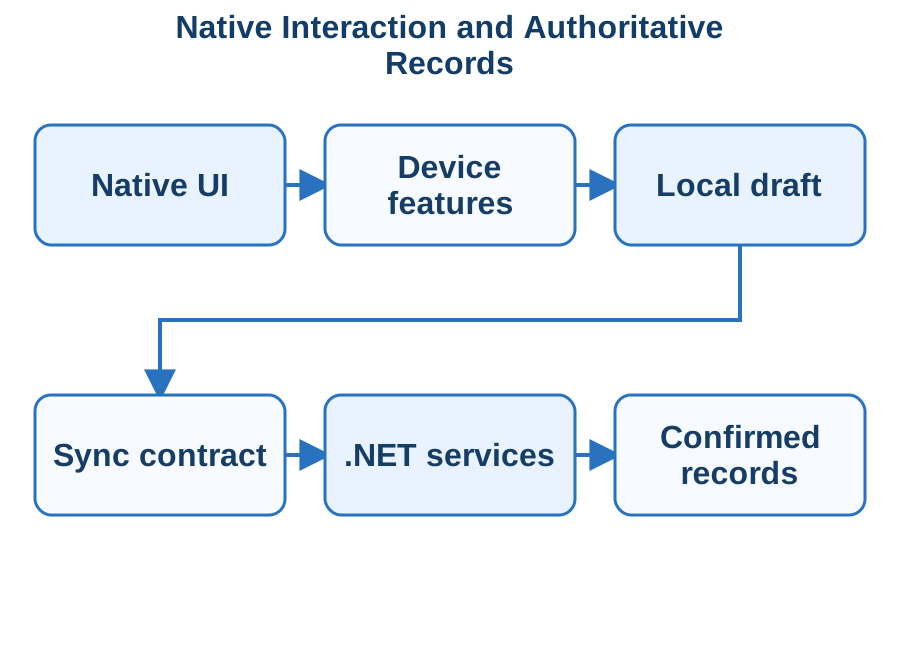
Installed clients call ASP.NET Core APIs through versioned contracts and the selected OpenID Connect/OAuth flow, including PKCE for public native clients. Keychain or Android Keystore-backed mechanisms protect credentials according to the platform design. Core Data, SQLite or Room stores the selected local records and operation queue. We define API concurrency, attachment ownership, token expiry and sign-out cleanup with the server so a device draft and a confirmed business result remain distinguishable.
ASP.NET Core services provide identity, validation and authoritative records through explicit contracts. We separate a queued local action from a server-confirmed result and define compatible API evolution for installed clients. Tokens, attachments and cached records have deliberate ownership and cleanup rules, including sign-out and shared-device use.
Design Around Suspension, Permissions and Offline Work
The application persists an identified draft or queued operation before suspension and resumes it through the platform's supported scheduling model. Android WorkManager and Apple BackgroundTasks are configured within their execution constraints, with user-visible pending and failed work. We exercise process termination, permission revocation, network changes and duplicate submission on real devices. The acceptance matrix covers OS, screen, text-scale and peripheral requirements.
We design the point at which a draft is persisted, an upload resumes or a request is retried after the process terminates. Permission denial and revoked access receive usable alternatives. Local storage and synchronisation include conflict handling and visible pending work, preventing an interrupted connection from turning an uncertain operation into a duplicate record.
Release With a Real-Device Acceptance Matrix
We deliver client projects, service contracts, release configuration and a real-device acceptance matrix. Testing follows complete tasks with a slow network, expired session, unavailable device feature and an application update with existing data. Accessibility, touch targets and system text scaling are reviewed alongside functional behaviour.
Signing identities and installed application identifiers are treated as maintained product assets. We document who can produce an update and how test and production builds reach their services. A staged release keeps compatibility with clients that have not yet upgraded, with diagnostic version information that support can obtain without exposing the user's private records.
Technologies & Integration
Discuss Your Project Back to Services
VR App Development
Sphere 10 builds VR applications for training, product visualisation and guided interactive experiences. We design the task the participant must complete, then implement its movement, interaction, content and feedback on the selected headset. The service includes the application around the immersive scene: session setup, participant records, operational controls and any .NET integrations needed to make the experience useful to the organisation.
We select Unity or Unreal Engine around the target hardware, visual requirements, existing assets and delivery team. OpenXR is used where the agreed engine, runtime and devices support the required features. The first build proves the hardest interaction and a measured frame-time budget before a large scene library is produced. Our .NET engineering supplies supporting services and application controls, while the VR engine owns rendering and headset interaction; framework and runtime dependencies are checked at that boundary.
Prove Movement and Interaction on the Headset
Unity XR Interaction Toolkit or Unreal's XR framework supplies the headset, input and interaction layer selected for the project. With OpenXR we verify the actual runtime, controller profile, tracking origin and required extensions on the target devices. The initial scene proves grabbing, pointing, locomotion, pause/exit and readable feedback within its measured CPU/GPU frame-time budget. Seated, standing and supervised operation receive distinct acceptance scenarios.
We define the intended play area, seated or standing use, supervision and supported input. Locomotion, controller or hand interaction and readable in-world feedback are tested early. The scene's visual complexity follows a measured performance budget, with an explicit route to pause or exit and alternatives for interactions that a participant cannot complete.
Connect Sessions to Useful Business Records
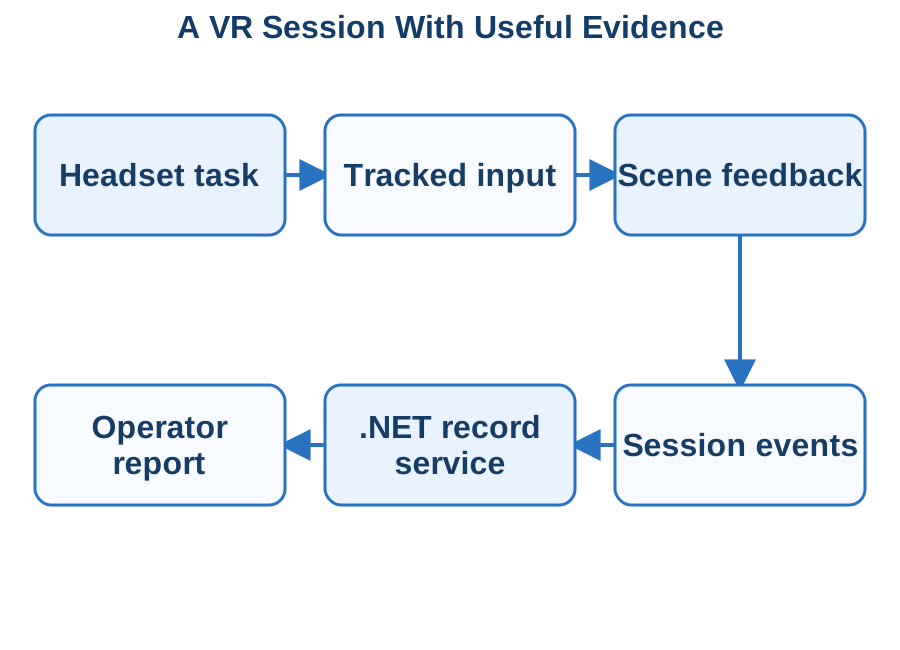
A training or demonstration session has a scenario generation, participant reference and identified task events sent to an ASP.NET Core service. The engine records only the agreed evidence, buffers interrupted submissions and reconciles server acknowledgements before marking an upload complete. C# service-side validation controls accepted task transitions and reporting. Session start, a failed interaction, completion and an interrupted upload are tested against the same reporting record.
A session record carries the participant reference, scenario generation and an ordered set of meaningful actions rather than an uncontrolled stream of pose samples. The client buffers the agreed events with stable identifiers, and the service acknowledges their durable receipt. Reports can then distinguish an incomplete session from a completed task whose upload is still pending.
Build an Owned Content and Deployment Pipeline
The asset pipeline records engine and XR package versions, source models, materials, audio and scenario identifiers. Unity asset bundles or Addressables and Unreal cooked content are configured for the chosen delivery model, with target-device shaders, loading and memory use checked in the packaged build. Maintainers receive the reproducible engine project, service contract and deployment instructions for the selected Meta Quest or PC OpenXR environment.
The delivered content pipeline records models, textures, audio, scenario versions and their ownership or licences. Build configuration identifies the supported headset runtime and deployment method. Operators receive installation and session-start guidance, while maintainers can reproduce the application package and identify which content generation was used in a recorded session.
Accept the Experience in Its Physical Setting
Acceptance uses the agreed headset and physical environment, with realistic session duration and content. We measure frame-time stability, loading and memory, and test tracking loss, controller disconnect and application restart. The handover includes engine projects, build instructions and any backend/admin components, plus the measured limits of the target device.
We inspect frame-time spikes during the transitions a participant actually experiences: scene load, grabbing an object and completion feedback. Audio cues, readable text and safety or exit controls are checked in the headset under the intended supervision model. Device temperature, battery and session-length conditions are recorded where they affect the accepted operating limit.
Technologies & Integration
Discuss Your Project Back to Services
Game Development
Sphere 10 develops games and interactive software from a testable gameplay loop through to repeatable release builds and supporting services. We define the player's actions, progression and failure cases, then build the client, content pipeline and online components around that experience. The engagement covers the practical work needed to operate and extend the product after its first successful demonstration.
Unity with C# or Unreal Engine with C++ is selected around the intended platforms, content requirements and team. We separate engine-owned rendering and physics from authoritative accounts, inventory and business records supplied by .NET services. Sphere10 Framework serialization and persistence mechanisms inform that service engineering where appropriate; engine compatibility is verified before any shared library is introduced. We keep measurable budgets for frame time, loading, memory and networking alongside the gameplay acceptance criteria, so visual work and systems work develop against the same product goals.
Make the Core Interaction Testable
We select Unity/C#, Unreal Engine/C++ and Blueprints, or Godot/C# around the game's mechanics, target hardware and content pipeline. Input actions, scene state and the simulation update are separated from rendering and persistence concerns. The first playable slice proves movement, camera, feedback and the main rule loop. CPU/GPU frame time, allocations and asset-loading costs are measured on the intended minimum hardware while the design is still inexpensive to change.
Input actions are mapped independently of individual keys or controller buttons, with dead zones and sensitivity suited to the target hardware. We tune feedback timing, camera behaviour and the conditions for success or failure through the playable loop. A small repeatable scenario makes changes to control feel and game rules reviewable before content production expands.
Separate Game Clients From Authoritative Services
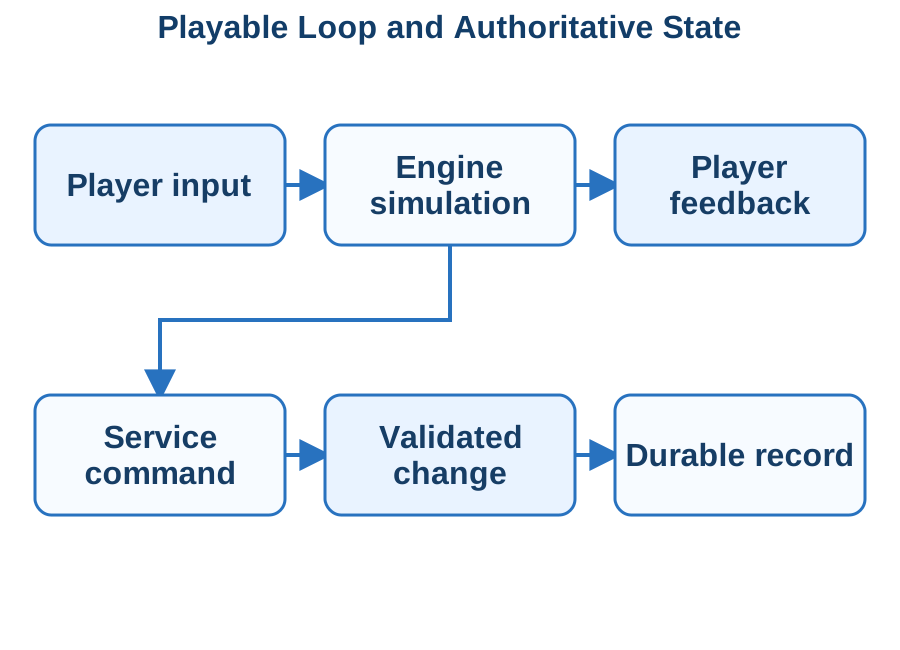
Real-time simulation authority follows the selected engine/networking model, including Unreal replication or the chosen Unity multiplayer stack. ASP.NET Core services separately own accounts, entitlements, progression and durable inventory; authenticated commands are validated against server-held records. We define session and operation identity, version compatibility and reconciliation between the visible client state and accepted result. Latency, disconnect and duplicate progression submissions receive explicit tests.
An inventory award or progression change has an operation identity and a server-side rule governing eligibility. The service records the result atomically and returns that recorded outcome when the same request is repeated. Client prediction can improve immediate feedback, while reconciliation resolves it against the confirmed record instead of trusting a local display value.
Build Content and Failure Handling Into the Project
Unity asset/scene delivery, Unreal cooked packages or Godot export presets are maintained with source assets, engine/plugin versions and build configuration. Save files carry a schema/content generation and a tested migration path. Background .NET services handle the agreed durable processing through recorded jobs and bounded retries. Packaged-client checks cover loading, old saves, cancelled work and unavailable services.
The implementation includes the engine project, agreed service components, build pipeline and operational diagnostics. Save-version migration, interrupted loading and network loss receive explicit behaviour. We control content and client-version compatibility so a new release does not silently make existing progress unreadable or assume that all installed players upgrade together.
Hand Over a Reproducible Product Build
The deliverable includes the engine project, asset/dependency inventory, build configuration and any service/admin code. Acceptance covers a complete player journey on the agreed hardware, clean installation, controller input, save/load and relevant network failures. We provide a release checklist and a clear division between engine content changes, client code and server migrations.
The packaged build receives measured frame-time, loading and memory checks on the agreed minimum hardware. We compare old saves and content identifiers with the proposed release and retain symbol or diagnostic files needed to explain a crash. A release record separates client binaries, downloadable content and service schema changes so their compatibility can be reviewed before distribution.
Technologies & Integration
Discuss Your Project Back to Services
No Code Development
Sphere 10 builds no-code and low-code applications around the records, decisions and approvals your business actually manages. We create internal request systems, field forms, customer onboarding, stock registers and operational dashboards, with clear ownership of the underlying data. Power Apps, Dataverse, Power Automate and Notion provide different building blocks. We choose the combination that fits your users, transactions and integration needs, then build the complete workflow rather than a collection of disconnected forms.
The useful result is a system your team can operate and change confidently. A purchase request should reach the right approver, retain its supporting documents and create the correct downstream record. A field inspection should preserve its evidence when connectivity drops. We combine platform configuration with focused .NET services for specialist validation, existing business systems and repeatable processing. Screens, permissions, exception queues and administration are designed together, so the application remains understandable as the business grows.
Model the Work Before Building Screens
We map the people, records and state changes behind the application. An equipment register needs durable asset identity and maintenance history; an onboarding process needs evidence, responsibilities and an explicit completion decision. Those differences determine the data model, screen sequence and automation. We use realistic examples to settle the rules before configuring controls.
Power Apps Canvas applications use Power Fx for task-specific forms and interaction. Model-driven applications build forms, views and navigation around Dataverse tables and relationships. We configure role access, validation and reporting against that data model, then select SharePoint, Dataverse or an existing API as the authoritative record source. Notion remains useful for collaborative content and lightweight records where its permission and transaction model fits the work.
Connect Configuration to Proper Integration
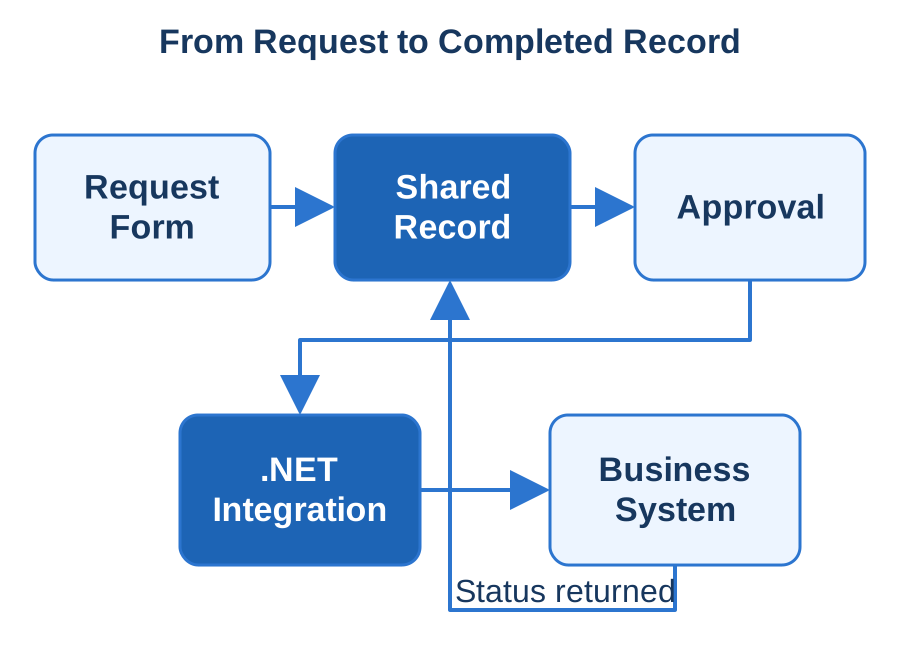
We connect forms and flows to your accounting, CRM, inventory or document systems through supported interfaces. Stable identifiers link the same customer or order across applications. A .NET integration service can own complex calculations, file processing or a transactional update while the configured application remains the working interface for your team.
When a workflow needs custom business logic, we implement Dataverse custom APIs and .NET plug-ins, or expose ASP.NET Core endpoints through a documented custom connector. Power Automate coordinates approvals and external operations with explicit retry and correlation rules. Local Notion demonstrates a related division: Notion supplies structured authoring while our .NET application handles synchronisation and publication. Sphere10 Framework contributes compatible application, data and diagnostic mechanisms to custom services.
Make Approval and Recovery Predictable
Automation must handle the day after the demonstration. We test rejected approvals, reassigned staff, duplicate triggers, expired connections and edits made while a flow is running. A retry must continue the intended work without creating a second invoice or sending contradictory messages. Operators need enough context to resolve a failure.
Offline support is specified for the actual Power Apps player. Dataverse offline-first profiles and local collection storage have different boundaries; browser-hosted Canvas applications do not provide the same offline execution as Power Apps Mobile. We select the records available on-device, exercise conflicting edits and reconnection, and show users which submissions remain pending. External API operations receive their own reconciliation rules.
Hand Over an Application Your Team Owns
We deliver the configured solution, data dictionary, integration mappings and operating instructions together. Your administrators can see which changes belong in a form or flow and which require an extension. Development and production connections remain separate, and deployment steps identify the accounts and configuration needed to reproduce the application.
We organise Power Platform changes into solutions, develop against unmanaged components and prepare managed deployments for downstream environments. Connection references, environment-specific values and service-account ownership are documented alongside the application's dependencies. Acceptance follows submit, review, correct and approve through the downstream record. Your team receives the solution, connector definitions and deployment procedure needed to maintain the application without relying on an individual maker's account.
Technologies & Integration
Discuss Your Project Back to Services
Hybrid App Development
Sphere 10 develops hybrid applications that combine a shared web interface with an installed mobile or desktop host. We build customer portals, field applications, internal workstations and device-connected tools where teams want productive interface reuse alongside camera, file, notification or operating-system integration. The application includes its native host, local state and supporting services. Navigation, sign-in and device behaviour are designed as part of the product from the outset.
For TypeScript applications, Capacitor provides a native runtime and plugin boundary, with Ionic available for the interface. For a C# and Razor codebase, Blazor Hybrid renders components inside a native .NET host. We choose the execution model around the work: which screens are shared, which capabilities are device-specific and what must continue without a network. Our .NET focus carries through to application services, integration and data contracts, giving the shared interface a dependable business system behind it.
Choose the Host Around the User Task
We establish the device range, distribution channel and operating conditions before selecting the host. A warehouse tablet with a scanner, a customer-facing mobile application and a desktop administration tool have different navigation and integration requirements. We identify the screens worth sharing and the platform interactions that make the product useful.
We build TypeScript interfaces with Ionic and Capacitor when web components and native plug-ins suit the product. For a C# stack, .NET MAUI Blazor Hybrid hosts Razor components inside BlazorWebView, with component code executing in the native .NET process. The host choice determines available device APIs, WebView behaviour, packaging and support obligations. We assess the existing React, Angular, Vue or Razor investment against those requirements.
Keep Device Access Behind a Clear Boundary
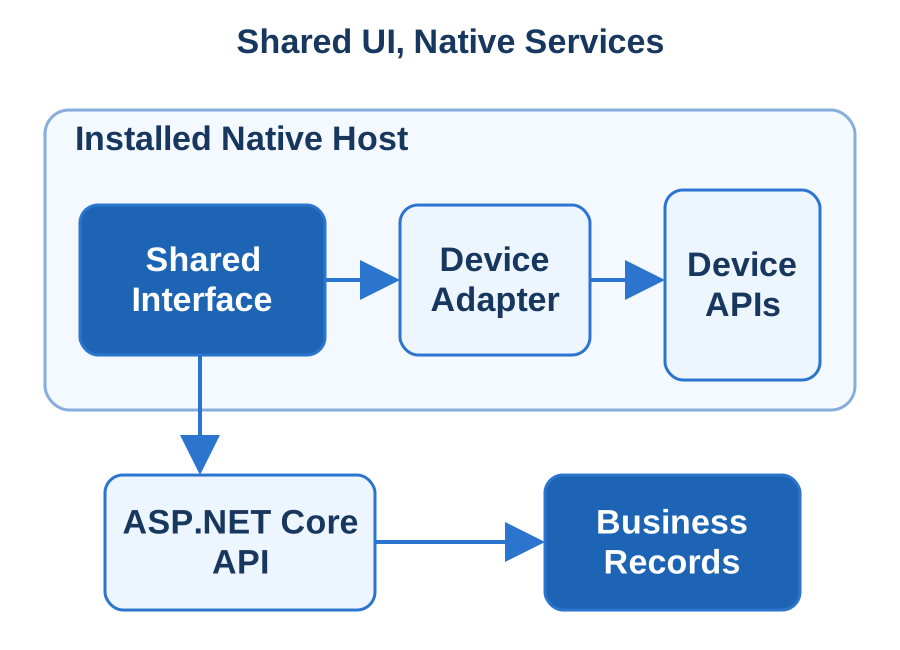
The interface calls a small set of application services for camera capture, secure storage, notifications and file operations. Those services validate inputs and own platform permissions. External links and untrusted content remain outside privileged application paths. Sign-in uses an appropriate system authentication flow with a defined return into the installed application.
Native camera, file, location and notification access sits behind small platform adapters. Capacitor plug-ins expose native functionality to JavaScript; Blazor Hybrid services can call .NET and platform code directly. ASP.NET Core APIs own shared business validation and authorisation. We select compatible Sphere10 Framework application, persistence and logging components for that service layer, with explicit contracts between the installed client and backend.
Design Offline Work and Resumption Together
Local working begins with a definition of what can be read or changed without a connection. We model drafts, pending uploads and confirmed server results separately. Stable operation identifiers allow a resumed request to be reconciled after a lost response. The user sees the state of their work instead of repeatedly tapping a submission button.
We store pending work in a versioned local database and reconcile it using stable operation identifiers. Authentication uses a system-browser OAuth flow with PKCE where supported by the identity provider, with secure platform credential storage and verified return links. Tests cover WebView text scaling, software keyboards, process termination and interrupted uploads on the actual iOS and Android builds, including recovery after a plug-in or database upgrade.
Deliver the Installed Product as a Whole
You receive the shared interface project, native host projects, device adapters and backend changes with repeatable build instructions. We document which assets are packaged, which content is fetched and how compatible updates reach each target. Signing identities, store accounts and environment settings have named owners throughout the release process.
The delivered product includes native projects, plug-in dependencies, signing configuration and a reproducible release procedure. Capacitor lifecycle and URL-open events, or the corresponding MAUI host lifecycle, restore the correct screen after backgrounding and external authentication. Acceptance follows install, sign-in, device work, reconnect and update over existing data. The handover identifies which shared features and native adapters each supported platform actually uses.
Technologies & Integration
Discuss Your Project Back to Services
iOS App Development
Sphere 10 builds iPhone and iPad applications for customer services, field teams and connected business products. We design the native experience, implement the device features and connect the application to the systems behind it. Appointment check-in, inspections, account management, document capture and specialist workflows each need a clear path from a user's action to a confirmed result. We develop that path across the interface, local data and backend.
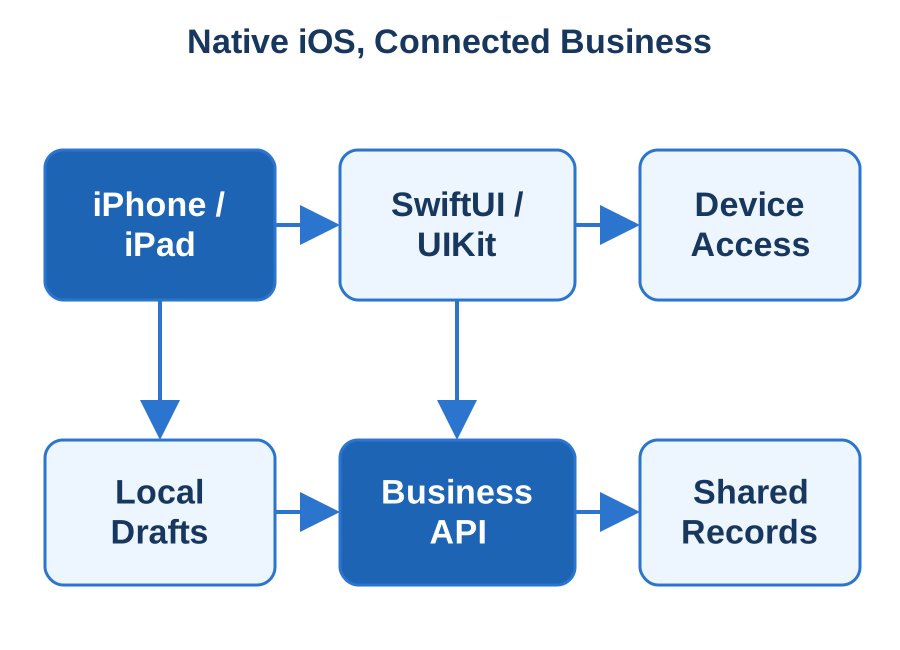
SwiftUI and UIKit provide the Apple interface, with .NET and ASP.NET Core supplying business services where appropriate. Our approach combines platform-specific interaction with disciplined application engineering: useful navigation, accessible controls, explicit permissions and reliable state transitions. A person should be able to resume an unfinished task, understand whether a submission reached the server and recover when a connection fails. We carry those requirements through physical-device testing, TestFlight distribution and the production release package.
Build an Interface That Belongs on iOS
We organise screens around the job rather than an existing database layout. Navigation, editing, search and confirmation follow a consistent interaction model for the selected iPhone and iPad sizes. SwiftUI supports declarative native screens, while UIKit provides established controls and specialist integrations where the application needs them.
Swift and SwiftUI provide the main native interface stack, with UIKit and Objective-C interoperability for existing applications or controls that need it. We design navigation, state and adaptive layouts for the intended iPhone and iPad workflows. VoiceOver order, Dynamic Type, focus and permission requests are exercised with the feature itself, including a useful route forward when camera, location or notification access is declined.
Connect Native Screens to Business Services
ASP.NET Core APIs handle business validation, authorisation, account state and integrations with existing records. A mobile request includes the identity and operation context needed to enforce permissions at the service. The interface displays the permitted choices, while the backend owns consequential decisions and durable updates.
Native screens use explicit service models over ASP.NET Core APIs. We choose SwiftData or Core Data for structured on-device persistence, Keychain for credentials and URLSession for network operations. Drafts and attachment uploads receive account-specific retention and recovery rules. Compatible Sphere10 Framework components supply backend composition, transactional data access and diagnostics, while the Apple application owns its presentation and device lifecycle.
Exercise the Mobile Lifecycle and Failure Paths
An iOS application must survive interruptions during useful work. We restore the necessary task state after suspension or process termination, reconcile uncertain submissions and show unfinished uploads. Stable request identifiers let the backend recognise a retry, so a resumed screen does not create a duplicate booking or order.
APNs notification entry points, StoreKit purchases and BackgroundTasks are integrated when they belong to the product's actual workflow. We verify server-side entitlement or transaction handling where required and make pending operations visible to the user. Physical-device tests cover session expiry, denied access, interrupted transfers and updates over existing records; background execution is designed around the scheduling and execution opportunities iOS provides.
Release Through a Repeatable Apple Workflow
The delivery includes the Xcode project, backend source, signing configuration instructions and the assets required for the agreed distribution channel. TestFlight provides a practical acceptance build on your team's devices. We record developer-account responsibilities, application identity, configuration and the steps that produce the submitted package.
We deliver the Xcode project, entitlements, signing and provisioning configuration, and a repeatable TestFlight/App Store Connect release path. Acceptance follows a complete customer or operator journey on the agreed hardware, including deep links and notification launches. API contracts, supported-device assumptions and diagnostic guidance accompany the build so subsequent releases can be reproduced and reviewed against an accepted application baseline.
Technologies & Integration
Discuss Your Project Back to Services
Android App Development
Sphere 10 develops Android applications for consumer products, field teams and dedicated business devices. We build the interface, local records and backend integration around the actual working environment: a warehouse scanner, a technician's phone, a shared tablet or a customer application. Kotlin and Jetpack Compose support a native experience, while our .NET services connect the application to authoritative business data and existing operational systems.
A useful Android application keeps track of work across changing network conditions, permissions and device state. A captured inspection should remain available after the screen closes. A scheduled upload should report its outcome. A retry should not create another order. We design those behaviours with the device fleet, supported operating systems and distribution channel in mind, then test them using representative hardware. The result includes repeatable builds, migration rules, diagnostics and the operating instructions needed to maintain the application.
Design for the Devices Doing the Work
We define the primary tasks and the device capabilities that support them. Barcode scanning, camera capture, Bluetooth accessories and location each bring different permission, lifecycle and manufacturer considerations. The interface provides a consistent workflow while adapting its controls and navigation to the supported screen sizes and input methods.
Kotlin and Jetpack Compose form the primary native UI stack, with Java and Android Views retained or integrated where an existing product needs them. We separate Compose screen state, ViewModel state and durable business work so rotation or process recreation does not discard an unfinished task. Material 3 components, adaptive layouts, keyboard input and TalkBack behaviour are checked against the actual phones, tablets or managed devices doing the work.
Combine Local Persistence With Clear Service Contracts
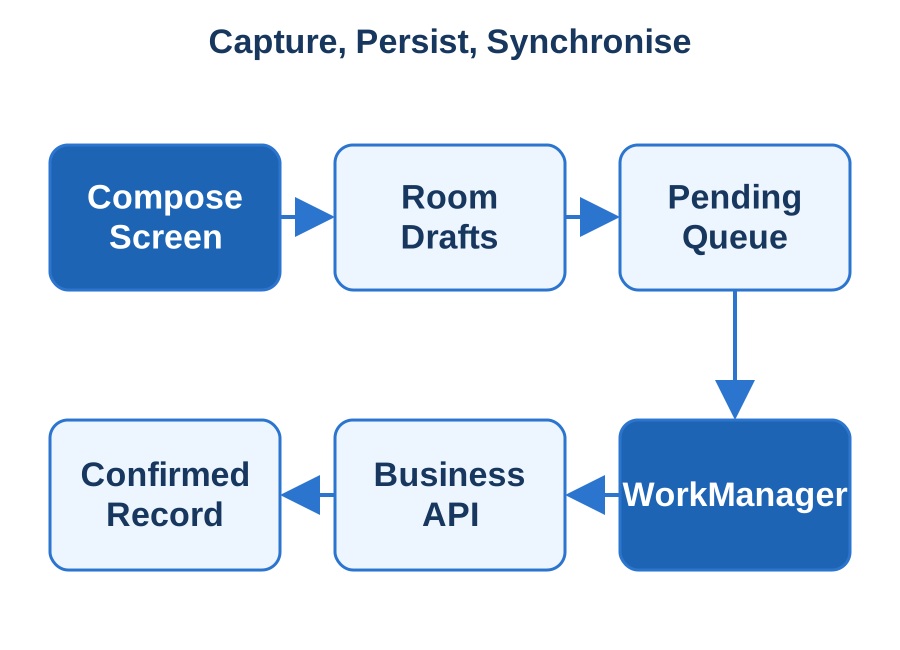
Room provides an application-facing layer over SQLite for structured local data. We use local records for drafts, appropriate cached information and queued operations. Every queued action carries the identity needed to reconcile it with the server, and its status distinguishes a pending request from a completed transaction.
Room provides a structured SQLite persistence layer, including schema migrations and query checking; application code defines the synchronisation protocol. ASP.NET Core APIs own shared validation, authorisation and business-system integration. Compatible Sphere10 Framework components contribute C# service composition, typed serialisation and data access. Stable identifiers and versioned API models let Android releases reconcile local work without coupling every client update to a backend deployment.
Handle Background Work and Recovery Deliberately
WorkManager is useful for deferrable persistent work such as synchronising eligible records after connectivity returns. We define its constraints and retry rules around the task rather than assuming an application can run continuously in the background. Time-sensitive and foreground operations are designed using the appropriate platform mechanisms.
WorkManager schedules persistent, deferrable work with constraints and retry policy. We design uploads and refresh operations around those semantics, then test process recreation, device-management restrictions, expired credentials and network loss. Firebase Cloud Messaging or Play Billing can be integrated for the selected notification or purchase flow, with backend verification and visible pending states. Time-critical foreground interaction receives a separate platform-appropriate execution design.
Deliver a Maintainable Android Release
We provide the Android Studio project, dependency inventory, signing instructions and package configuration for the selected channel. Public Google Play distribution, managed enterprise deployment and dedicated-device installation have different requirements. We agree that route early and prepare the build and operational information needed for it.
Delivery includes the Android Studio/Gradle project, signing arrangements and the Android App Bundle or enterprise APK required by the distribution channel. We verify installation, sign-in, local work, synchronisation and an update over an existing database. Handover records supported devices, permission declarations, backend contracts and diagnostic procedures so your team can reproduce releases and distinguish a device restriction from a rejected business operation.
Technologies & Integration
Discuss Your Project Back to Services
Progressive Web App Development
Sphere 10 builds progressive web applications for products that benefit from browser reach, installation and selected offline capabilities. We deliver customer portals, field tools, reference systems and operational interfaces that work from a URL and can provide an app-like experience on supported devices. The application combines responsive screens, a useful local working model and a backend that owns the business result. Installation is one part of that experience.
A technician may need instructions and an unfinished inspection without a connection. A customer may need a quick return to a regularly used service. A team may want one web release rather than separate installed clients. We define the work each browser must support, then engineer caching, local records, authentication and update behaviour around it. Our ASP.NET Core services provide validation and integration with existing systems, while the browser presents clear pending, stale and confirmed states to the user.
Build the Browser Experience Around Real Tasks
We design the navigation, layouts and controls for the devices people will use, including narrow phones and keyboard-driven desktops. The web application manifest supplies installation metadata such as name, icons and launch presentation. Browser support and installation behaviour are checked against the agreed device matrix.
We build the browser application with TypeScript and React, Angular or Vue, or choose Blazor WebAssembly when a client-side C# component model fits. ASP.NET Core supplies authenticated business APIs. A Web App Manifest describes install identity and presentation; HTTPS and the supported browser's capabilities govern the available features. Local Notion demonstrates linked HTML publication engineering, while a transactional PWA adds its own client state and service contracts.
Separate Cached Assets From Business Records
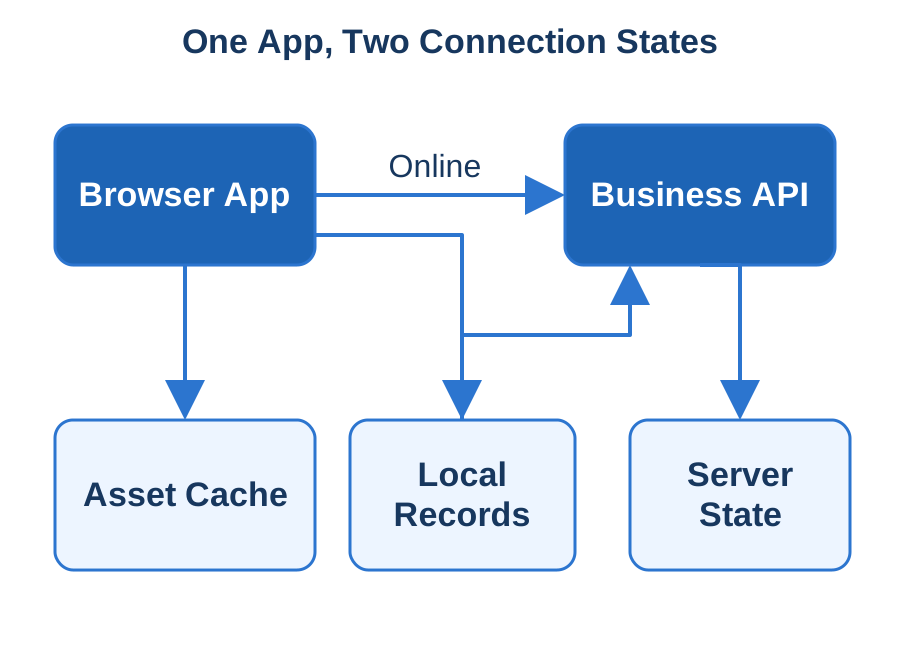
A service worker can intercept network requests and manage suitable cached responses. We select strategies for application assets, reference content and online data separately. A cached shell must still tell the user when current information cannot be reached. Authenticated responses and account switching need explicit cache boundaries.
Cache Storage holds versioned application assets and deliberately selected responses; IndexedDB stores structured records, drafts and queued operations. We implement schema migration, account-specific retention and a server reconciliation protocol with stable operation IDs. OpenID Connect/OAuth integration and API authorisation are designed alongside that storage model, including logout cleanup and the treatment of sensitive records on shared devices.
Treat Reconnection and Updates as Workflows
We test the first visit, a repeat launch without connectivity, a slow connection and a return after the server has changed. Conflicts and expired sessions receive deliberate screens. Users can understand what was saved, what needs attention and whether repeating an action is safe.
A service worker has an installation and activation lifecycle separate from the open page. We design update prompts, cache invalidation and activation around incomplete forms, then test recovery after storage eviction or an interrupted deployment. Push notifications and background synchronisation are added against the actual browser/device capability matrix. Foreground retry remains part of the workflow so supported tasks can recover when background execution is unavailable.
Hand Over a Web Application That Can Evolve
Delivery includes the interface source, service worker, manifest, local schema and backend changes with reproducible build and deployment instructions. Configuration identifies environment URLs, authentication settings and cache versioning. Your team can see how content updates and application releases reach users and how failures are diagnosed.
Acceptance uses the agreed Safari, Chromium and Firefox targets through online use, repeat visits, installation where supported and offline/reconnection cases. We exercise an older open client against a newer API and verify update handling with pending work. Delivery includes the manifest, worker/cache policy, deployment headers, API contract and tested capability matrix, giving future releases a concrete application and data baseline.
Technologies & Integration
Discuss Your Project Back to Services