How to Give an Ordinary File Commit and Rollback in C#
Writing a group of changes straight into a file leaves a window in which the file is half updated. If the operation fails part-way, or the process stops, the file holds a mixture of old and new data, and undoing it means the application must have kept its own copy of what was there before.
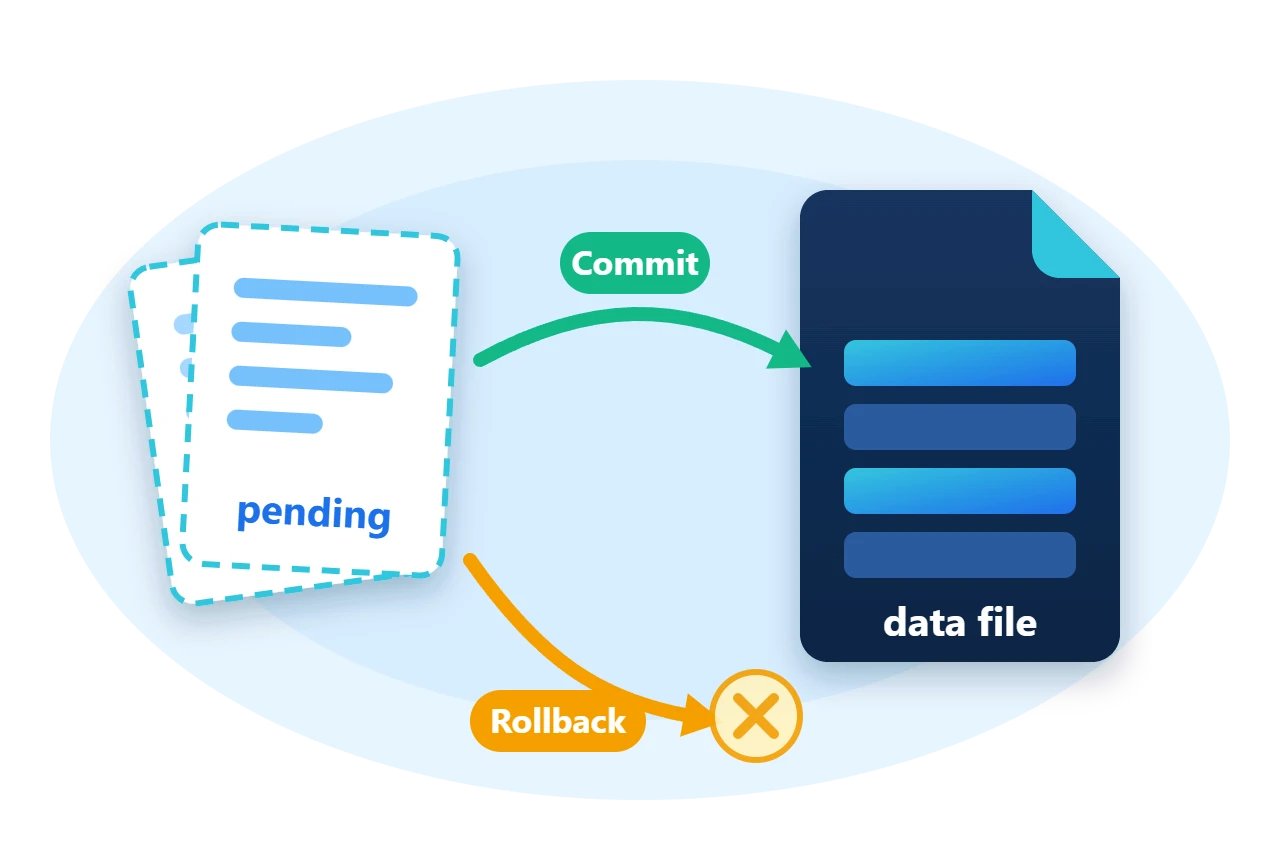
TransactionalStream in Sphere10 Framework removes that window for any file. It is a seekable Stream whose writes are staged beside the file until Commit() publishes them, and Rollback() discards them. This article shows how the staging works, how to use the stream directly, and how TransactionalList<T> builds a durable collection on top of it.
1. Use a transactional stream
A TransactionalFileDescriptor names the file and the folder for uncommitted pages. Its From method also accepts a page size and a memory budget for cached pages.
using (var stream = new TransactionalStream(TransactionalFileDescriptor.From(path, pages))) {
	stream.Committed += () => commits++;
	stream.RolledBack += () => rollbacks++;

	stream.Write(committed);
	stream.Commit();

	stream.Write(Encoding.ASCII.GetBytes(" and bytes that are rolled back"));
	Require(stream.Length > committed.Length, "The staged write is not visible to its own stream.");
	Require(new FileInfo(path).Length == committed.Length, "A staged write reached the file before commit.");
	stream.Rollback();
	Require(stream.Length == committed.Length, "Rollback left the staged bytes.");

	stream.Position = stream.Length;
	stream.Write(Encoding.ASCII.GetBytes(" never committed"));
	// Disposing with uncommitted changes rolls them back.
}
Three behaviours are visible in this block.
-
A staged write is visible through the stream that made it, while the file on disk still has its committed length.
-
Rollback()returns the stream to the committed content, including its length. -
Disposing the stream with uncommitted changes rolls them back, so forgetting to commit never publishes a partial update.
The stream implements ITransactionalObject, which is the Framework's shared transaction contract.
| Member | Purpose |
Commit(), CommitAsync() |
Publish the staged changes |
Rollback(), RollbackAsync() |
Discard the staged changes |
Committing, Committed |
Raised before and after a commit |
RollingBack, RolledBack |
Raised before and after a rollback |
The default access mode opens or creates the file and loads it at once. Pass a FileAccessMode without the AutoLoad flag to defer loading, and then call Load() before the first use.
2. How writes are staged
A transactional file is read and written in fixed-size pages through a TransactionalFileMappedBuffer. A page that has been changed is not written back to the file. It is written to its own page file in a separate folder, and a marker records its state. The data file itself stays exactly as it was at the last commit.
Commit() copies the changed pages into the file and removes the page files. Rollback() removes them without touching the file. Because the markers are on disk, a commit or rollback that was interrupted is resumed the next time the file is loaded.
Diagram source
---
config:
  sequence:
    actorMargin: 8
    width: 96
    mirrorActors: false
    messageMargin: 28
    noteMargin: 8
---
sequenceDiagram
    participant A as Application
    participant S as Stream
    participant F as Data file
    A->>S: Write(bytes)
    Note over S: pages staged in folder
    A->>S: Commit()
    S->>F: copy changed pages
    A->>S: Write(bytes)
    A->>S: Rollback()
    Note over S: page files discarded
3. Build on the stream
TransactionalStream is an ordinary seekable stream, so anything that stores itself in a stream becomes transactional when placed on top of it. The Framework's own collections are layered this way.
TransactionalList<T> is a list whose items live in a file and whose changes become durable only on commit. TransactionalDictionary<TKey, TValue> and TransactionalHashSet<TItem> are built the same way.
Diagram source
block-beta
    columns 1
    L["TransactionalList"]
    M["Stream-mapped list<br/>items and serializer"]
    C["ClusteredStreams<br/>allocation"]
    S["TransactionalStream"]
    B["TransactionalFileMappedBuffer<br/>pages and markers"]
    F[("Data file + page files")]
using (var list = new TransactionalList<string>(Sphere10FrameworkFileDescriptor.From(path, pages), new StringSerializer(Encoding.UTF8))) {
	list.AddRange(new[] { "alpha", "beta", "gamma" });
	list.Commit();

	list.Add("delta");
	list.Update(0, "ALPHA");
	list.RemoveAt(1);
	Require(list.Count == 3 && list.Read(0) == "ALPHA", "Staged changes are not visible to the list.");
	list.Rollback();
	Require(list.Count == 3 && list.Read(0) == "alpha" && list.Read(1) == "beta", "Rollback did not restore the committed items.");

	list.Add("delta");
	list.Commit();
}
The insert, the update and the removal are undone together by one Rollback(), and the list is usable straight afterwards. Sphere10FrameworkFileDescriptor extends the transactional descriptor with the cluster size and byte order of the stream-mapped layer. Reopening the file with the same descriptor settings and serializer returns the committed items.
using (var reopened = new TransactionalList<string>(Sphere10FrameworkFileDescriptor.From(path, pages), new StringSerializer(Encoding.UTF8))) {
	var items = reopened.ReadRange(0, (int)reopened.Count).ToArray();
	Require(items.SequenceEqual(new[] { "alpha", "beta", "gamma", "delta" }), "The reopened list differs from the committed items.");
	Console.WriteLine($"List: reopened with {string.Join(", ", items)}");
}
A file-backed
ObjectSpace
uses the same stream beneath its dimensions and indexes, which is where its Commit and Rollback come from.
4. Ownership and limits
-
One transaction per file. Everything written since the last commit is committed or rolled back together. There are no savepoints or nested transactions at this level.
-
One owner at a time. Nothing here coordinates two instances, or two processes, that open the same file.
-
Keep the page folder with the file. Uncommitted pages and their markers live there, so reopen a file with the same page folder.
-
Dispose is a rollback. End every unit of work with an explicit
Commit(). -
The file is not locked against other tools. A program that edits the data file directly bypasses the transaction.
5. Get the package and run the sample
The transactional types are in the Sphere10.Framework namespace of the Sphere10.Framework NuGet package. The sample targets .NET 10.
dotnet new console --framework net10.0 --name ArticleSample
cd ArticleSample
dotnet add package Sphere10.Framework --version 3.1.3
The complete MIT-licensed sample contains the program shown in this article. Extract the download over the generated project and run it against a new directory.
dotnet run -c Release -- ./fresh-data
Stream: file holds "committed bytes" after one commit, one rollback and one abandoned write
List: reopened with alpha, beta, gamma, delta
No uncommitted page files remain
The transactions guide lists the transactional types and the scope classes for transactions that span nested calls.
The Sphere10 Framework overview describes the rest of the toolkit.
Author: Herman Schoenfeld
