
How to Store Indexed Records with ObjectStream
Sometimes one type of record is all an application needs to persist, and a full object database with several dimensions and identity tracking is more than the job requires. What is still wanted is a file of serialized objects that can be read by position and found by key without a scan.
ObjectStream<T> in Sphere10 Framework is that building block. It stores one object per logical stream of a clustered container and keeps its indexes in the same storage. This article shows how to create an indexed ObjectStream over a file, save, update and remove items, look them up through the indexes and reopen the file without supplying its schema.
1. Declare the item and its indexes
The item is a plain class. The ObjectStream assembles a serializer for it automatically.
public sealed class Entry {
	public long Id { get; set; }

	public string Code { get; set; }

	public int Group { get; set; }
}
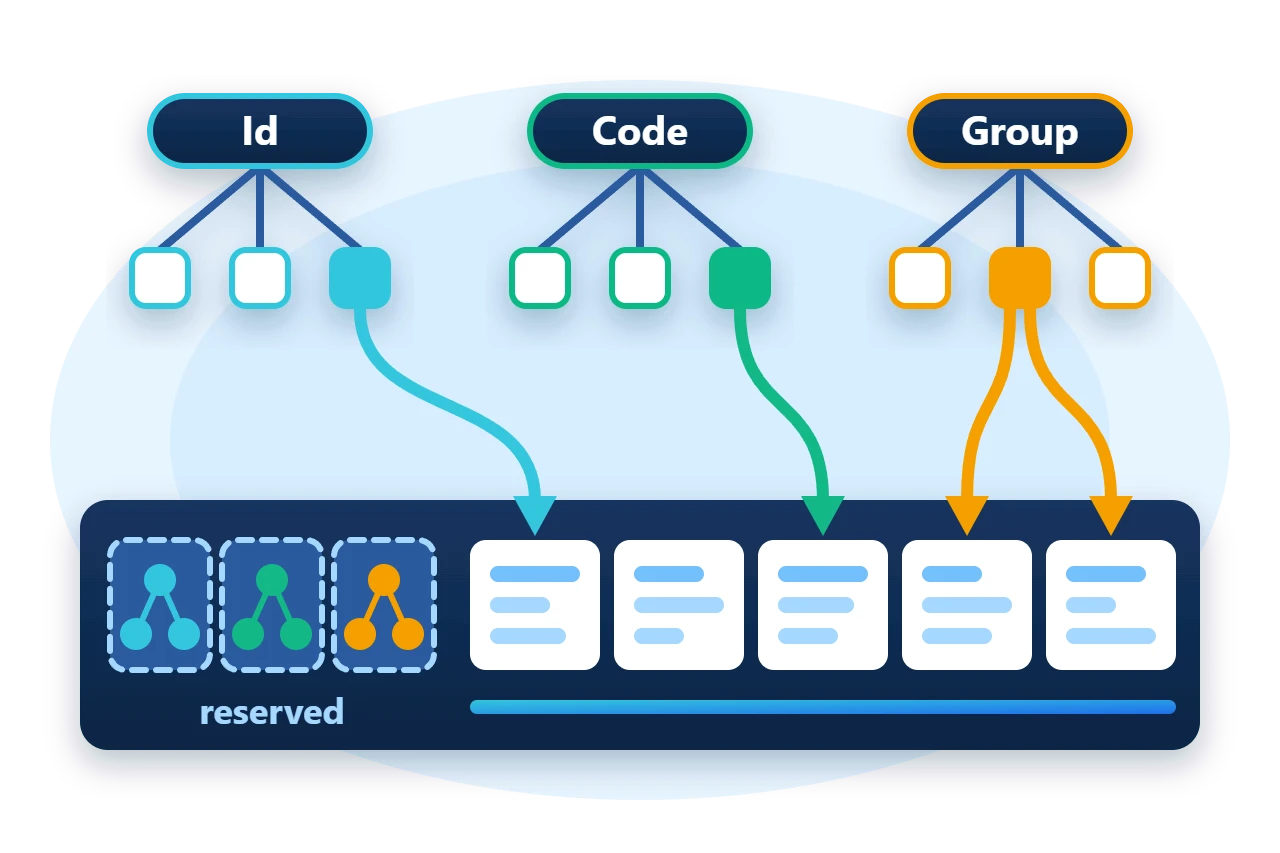
Indexes are described with ObjectStreamMetaData.Index rows. Each row names an index kind, the member it projects and the B-tree layout it uses.
var spec = new BTreeSpec(BTreeType.BTree, 64);
var indexes = new[] {
	new ObjectStreamMetaData.Index { Kind = ObjectSpaceDefinition.IndexType.Identifier, Name = nameof(Entry.Id), MemberName = nameof(Entry.Id), BTreeSpec = spec },
	new ObjectStreamMetaData.Index { Kind = ObjectSpaceDefinition.IndexType.UniqueKey, Name = nameof(Entry.Code), MemberName = nameof(Entry.Code), BTreeSpec = spec },
	new ObjectStreamMetaData.Index { Kind = ObjectSpaceDefinition.IndexType.Index, Name = nameof(Entry.Group), MemberName = nameof(Entry.Group), BTreeSpec = spec }
};
| Kind | Keys | A key maps to |
Identifier |
Unique | One position |
UniqueKey |
Unique | One position |
Index |
Shared | A group of positions |
Naming an index after its member lets the member-expression lookups find it, because GetIndexFor and GetUniqueIndexFor search by member name. An index with another name is reached through TryGetIndex or TryGetUniqueIndex with that name.
2. How an ObjectStream is stored
An ObjectStream sits on a ClusteredStreams container, which divides one stream into many independently sized logical streams. The first logical streams are reserved for attachments, which is where the indexes live. Every stream after them holds one serialized item.
An item is addressed by its position. Position 0 is the first stream after the reserved ones, and the ObjectStream adds the reserved count for you. The same structure sits under the Framework's stream-mapped collections and under every dimension of an ObjectSpace, where one ObjectStream is roughly one table.
Diagram source
block-beta
    columns 1
    A["Container header, 256 bytes"]
    B["ObjectStreamMetaData record<br/>optional"]
    C["Reserved streams<br/>Id, Code and Group indexes"]
    D["Item 0"]
    E["Item 1"]
    F["Item 2 ..."]
3. Create the stream and save items
The constructor that takes a raw Stream creates the clustered container and owns it. The raw stream stays with the caller.
using (var file = File.Open(path, FileMode.CreateNew, FileAccess.ReadWrite)) {
	using var entries = new ObjectStream<Entry>(file, clusterSize: 256, storeMetaData: true, indexes: indexes);
	entries.Load();
	entries.PostItemOperation += (position, item, operation) => operations++;

	entries.SaveItem(0, new Entry { Id = 10, Code = "A", Group = 1 }, ObjectStreamOperationType.Add);
	entries.SaveItem(1, new Entry { Id = 20, Code = "B", Group = 1 }, ObjectStreamOperationType.Add);
	entries.SaveItem(2, new Entry { Id = 30, Code = "C", Group = 2 }, ObjectStreamOperationType.Add);
SaveItem takes the position, the item and the operation. Add appends a new stream, Update rewrites the stream at a position and Insert places a new stream before one. storeMetaData: true writes the item type, its serializer definitions and the index rows into the container, which is what allows the file to be reopened without them later.
Indexes are observers. Each one subscribes to the stream's PreItemOperation and PostItemOperation events and keeps itself current as items change, so there is no separate indexing step. Your own code can subscribe to the same events, as the sample does to count operations.
Diagram source
---
config:
  sequence:
    actorMargin: 8
    width: 96
    mirrorActors: false
    messageMargin: 28
    noteMargin: 8
---
sequenceDiagram
    participant C as Caller
    participant S as ObjectStream
    participant I as Index
    C->>S: SaveItem(Add)
    S->>I: PreItemOperation
    Note over I: reject duplicate key
    S->>S: write item stream
    S->>I: PostItemOperation
    Note over I: record key, position
4. Look up through an index
A unique index exposes Values as a dictionary from key to position. A nonunique index exposes it as a lookup from key to a group of positions. Either way the index returns positions, and LoadItem reads the items.
var position = entries.GetUniqueIndexFor(item => item.Code).Values["B"];
var entry = entries.LoadItem(position);
Require(position == 1 && entry.Id == 20, "Unique index did not resolve the saved position.");

var groupOne = entries.GetIndexFor(item => item.Group).Values[1].ToArray();
Require(groupOne.SequenceEqual(new long[] { 0, 1 }), "Group index did not return both positions.");
Saving a changed item with Update moves its index entries. After the following lines the item is in the group for key 2.
entry.Group = 2;
entries.SaveItem(position, entry, ObjectStreamOperationType.Update);
A unique index checks the key before the write. Adding a second item with the code "A" throws, and the stream still holds three items.
5. Remove or reap an item
There are two ways to delete, and they differ in what happens to positions.
entries.ReapItem(0);
Require(entries.IsReaped(0) && !entries.GetUniqueIndexFor(item => item.Code).Values.ContainsKey("A"), "Reap did not clear the index entry.");
Require(entries.GetUniqueIndexFor(item => item.Code).Values["B"] == 1, "Reap moved a later position.");

entries.SaveItem(3, new Entry { Id = 40, Code = "D", Group = 3 }, ObjectStreamOperationType.Add);
entries.RemoveItem(entries.Count - 1);
-
ReapItemempties a position and marks it reaped. Its index entries are removed and every other item keeps its position. The Framework's recyclable lists build on this to reuse reaped slots. -
RemoveItemdeletes the stream itself. With these indexes attached it is only supported for the last position, because the indexes store positions and do not renumber.
6. Reopen without the schema
Because the metadata was stored, ObjectStream.TryOpenFromStream rebuilds the serializer and the indexes from the file. The caller supplies only the byte order.
using (var file = File.Open(path, FileMode.Open, FileAccess.ReadWrite)) {
	Require(ObjectStream.TryOpenFromStream(file, Endianness.LittleEndian, out var opened), "Stored metadata did not reopen the stream.");
	using var entries = (ObjectStream<Entry>)opened;
	var position = entries.GetUniqueIndexFor(item => item.Id).Values[30L];
	var groupTwo = entries.GetIndexFor(item => item.Group).Values[2].ToArray();
A file created without metadata is reopened with the same constructor arguments it was created with, including the same index rows in the same order.
7. Limits
LoadItem calls for one position return two separate objects. It has no transaction of its own either, and each write goes straight to the underlying stream. Use an
ObjectSpace
when you need several record types, tracked instances or commit and rollback.
-
The B-tree type and order of an index are part of the stored layout and cannot be changed in place.
-
Group several operations under
EnterAccessScope()when they must not interleave with other users of the container. -
Disposing the ObjectStream disposes the container it created. It does not close the raw stream it was given.
8. Get the package and run the sample
ObjectStream<T> is in the Sphere10.Framework package.
dotnet add package Sphere10.Framework --version 3.1.3
The complete MIT-licensed sample contains the code shown above.
dotnet run -c Release -- ./fresh-data
Positions: 3; observed operations: 12
Reopened without a schema: Id 30 is at position 2; group 2 holds 2 items
Index, update, duplicate, remove and reopen checks: passed
The operation count includes reads, which are reported to observers as well. The ObjectStream guide lists the types, and the clustered streams guide describes the container underneath.
The Sphere10 Framework overview describes the rest of the toolkit.
Author: Herman Schoenfeld
