How to Build a Persistent Dictionary and Set in C#
A Dictionary<TKey, TValue> or a HashSet<T> disappears when the process exits. Keeping one on disk usually means either rewriting a whole serialized snapshot after every change or adopting a database for what is only a keyed lookup.
Sphere10 Framework's stream-mapped collections store a dictionary, a set or a slot-reusing list directly in a file, behind the standard collection interfaces. This article creates each of them with StreamMappedFactory, explains how keys are found and how removed slots are reused, and shows what has to match when a file is reopened.
1. A first look
CreateDictionaryKvp takes the stream, a cluster size, and serializers for the key and the value. It returns a StreamMappedDictionary<TKey, TValue>, which implements IDictionary<TKey, TValue>.
var text = new StringSerializer(Encoding.UTF8);
using (var file = File.Open(path, FileMode.CreateNew, FileAccess.ReadWrite)) {
	using var dictionary = StreamMappedFactory.CreateDictionaryKvp<string, string>(file, ClusterSize, text, text, autoLoad: true);
	dictionary.Add("alpha", "first");
	dictionary.Add("beta", "second");
	dictionary.Add("gamma", "third");
	dictionary["beta"] = "second, updated";
	dictionary.Remove("alpha");
}
Reopening uses the same factory call over the existing file.
using (var file = File.Open(path, FileMode.Open, FileAccess.ReadWrite)) {
	using var reopened = StreamMappedFactory.CreateDictionaryKvp<string, string>(file, ClusterSize, text, text, autoLoad: true);
	Require(reopened.Count == 2, "Reopened dictionary count differs.");
	Require(reopened.TryGetValue("beta", out var value) && value == "second, updated", "Updated value was lost.");
	Require(!reopened.ContainsKey("alpha"), "Removed key came back.");
}
The reopened dictionary holds the two remaining entries, including the updated value. autoLoad: true loads existing content during creation. Without it, call Load() when RequiresLoad is true.
2. How the collections are stored
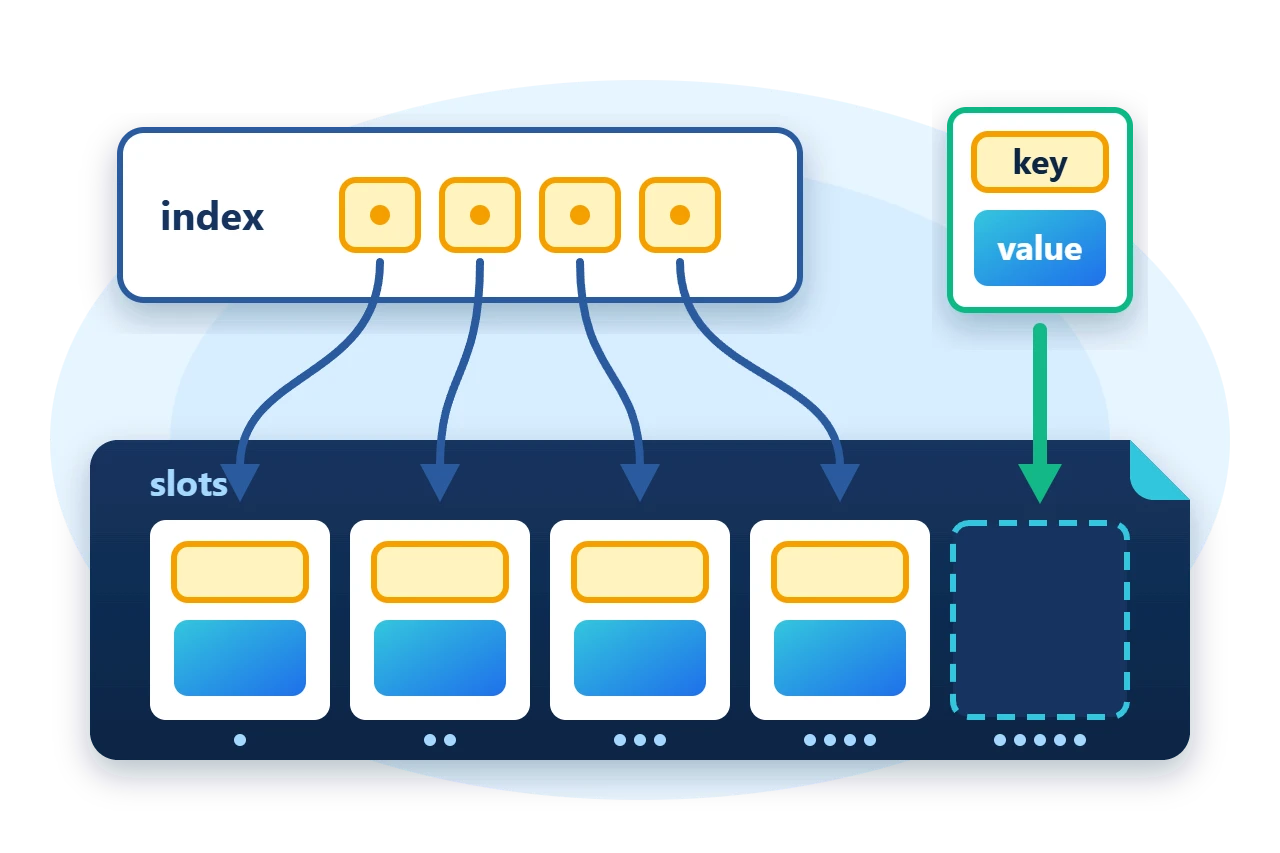
Each collection keeps its items in an object stream, which is a list of serialized items in numbered slots. The object stream lives in a clustered-streams container that divides one file, or any seekable stream, into many independent logical streams. Beside the items, the container holds attachments, which are small persistent structures such as a key index and a list of free slots.
Two things follow from this design. Items can be any size, because each occupies its own logical stream, and a change writes only the item and the index entries it affects, never the whole collection.
The factory builds four related collections.
| Factory method | Result |
CreateDictionaryKvp |
Dictionary with keys of any length |
CreateDictionaryClk |
Dictionary with constant-length keys |
CreateHashSet |
Set of items |
CreateRecyclableList |
List that reuses freed slots |
3. Store values under keys of any length
The dictionary in the first look accepts keys of any length. Each entry is stored as one key/value pair in a slot. A lookup does not read every pair. The dictionary keeps a checksum index attachment that maps the checksum of each key to the slots that hold it, reads only those candidates and compares their keys.
Diagram source
---
config:
  sequence:
    actorMargin: 8
    width: 96
    mirrorActors: false
    messageMargin: 28
    noteMargin: 8
---
sequenceDiagram
    participant C as Caller
    participant D as Dictionary
    participant I as Key index
    C->>D: TryGetValue(key)
    D->>I: checksum of key
    I-->>D: candidate slots
    Note over D: read pair, compare key
    D-->>C: value or false
4. Use constant-length keys
When every key serializes to the same number of bytes, as integers, GUIDs and digests do, CreateDictionaryClk is the better fit. It returns a StreamMappedDictionaryCLK<TKey, TValue> that stores only the values as items and keeps the keys together in a key store attachment.
using var dictionary = StreamMappedFactory.CreateDictionaryClk<long, string>(file, ClusterSize, PrimitiveSerializer<long>.Instance, text, autoLoad: true);
for (var key = 1L; key <= 1000; key++)
	dictionary.Add(key, $"value {key}");
The key serializer must report a constant size. A variable-length serializer can be given one with AsConstantSize(length) when the keys have a known upper bound. StreamMappedFactory.CreateDictionary chooses between the two implementations for you. It selects the constant-length form when the key serializer is constant-size and no larger than 256 bytes.
5. Store a set
CreateHashSet builds a StreamMappedHashSet<T>, an ISet<T> whose membership test is by digest. Internally it is a constant-length-key dictionary keyed by the hash of each serialized item, computed with the hash function you name.
using var set = StreamMappedFactory.CreateHashSet(file, ClusterSize, text, CHF.SHA2_256);
if (set.RequiresLoad)
	set.Load();
Require(set.Add("red") && set.Add("green"), "New items were rejected.");
Require(!set.Add("red"), "Duplicate item was accepted.");
This factory method has no autoLoad parameter, so the sample loads the set explicitly.
6. Reuse slots with a recyclable list
Removing an item from the middle of an ordinary list shifts every later index. A recyclable list never shifts. Recycle(index) frees one slot and records it in a free-slot attachment, and the next Add fills a freed slot before the list grows. The dictionaries and the set use the same mechanism for their removed entries.
list.Add("zero");
list.Add("one");
list.Add("two");
list.Recycle(1);
Require(list.Count == 2 && list.ListCount == 3 && list.RecycledCount == 1 && list.IsRecycled(1), "Recycle did not free the slot.");
list.Add("replacement");
Require(list.ListCount == 3 && list.RecycledCount == 0 && list.Read(1) == "replacement" && list.Read(2) == "two", "Freed slot was not reused.");
The three slots look like this after Recycle(1) and then after the next Add.
Count is the number of live items, ListCount is the number of slots, and RecycledCount is the number of free slots. An index therefore stays valid for as long as its item lives, which is what lets other structures refer to items by slot.
Diagram source
---
config:
  packet:
    bitsPerRow: 16
    bitWidth: 22
    showBits: false
---
packet-beta
0-4: "0: zero"
5-10: "1: free"
11-15: "2: two"
16-20: "0: zero"
21-26: "1: replacement"
27-31: "2: two"
7. What must match on reopen
A file does not describe how it was created. Supply the same values every time it is opened.
-
The cluster size.
-
The key and value serializers, and for a set the hash function.
-
The byte order, which defaults to little-endian.
-
The factory method, since the two dictionary forms use different layouts.
8. Ownership and limits
Disposing a collection disposes the container that the factory created for it. The stream you passed in stays yours, so dispose the collection first and the stream second, as the nested using statements above do.
9. Get the package and run the sample
The collections ship in the core Sphere10.Framework package. The sample targets .NET 10.
dotnet new console --framework net10.0 --name ArticleSample
cd ArticleSample
dotnet add package Sphere10.Framework --version 3.1.3
The complete MIT-licensed sample contains the program shown above. Extract the download over the generated project and run it against a new directory.
dotnet run -c Release -- ./fresh-data
String-keyed dictionary after reopen: 2 entries, beta = second, updated
Long-keyed dictionary after reopen: 1000 entries, 777 = value 777
Set after reopen: 2 items, duplicate rejected
Recyclable list: slot 1 reused, 3 items in 3 slots
The stream-mapped factory source shows every overload, and the Collections guide lists the related types.
The Sphere10 Framework overview describes the rest of the toolkit.
Author: Herman Schoenfeld
