
How to Reuse a Pascal Grid in Delphi and Lazarus
Delphi's VCL and Lazarus's LCL are similar but not interchangeable. Their grid controls differ in units, drawing and resources, so a data screen written against one native grid usually has to be written again for the other. Sharing the record types does not remove that duplicated presentation code.
TVisualGrid in Sphere 10 Pascal Framework is a single data-bound grid that compiles for both. The application writes one data source and one grid configuration, and the Framework adapts the control to the native toolkit. This article shows what the shared source looks like, where the compiler-specific boundary sits and what each environment still has to supply.

1. A first look
The grid is created, parented and bound with the same statements in both environments.
    Source := TItemSource.Create(Window);
    Source.SnapshotCacheEnabled := True;
    Grid := TVisualGrid.Create(Window);
    Grid.Parent := Window;
    Grid.Align := alClient;
    Grid.FetchDataInThread := False;
    Grid.AddColumn('Id').Binding := 'Id';
    Grid.AddColumn('Name').Binding := 'Name';
    Grid.AddColumn('Value').Binding := 'Value';
    Grid.ManualPageSize := 25;
    Grid.PageMode := vpmManual;
    Grid.DataSource := Source;
TItemSource is the application's own data source, and each grid column is bound to one of its columns by name. The following sections show where the toolkit differences are handled and what the data source contains.
2. Where the platform boundary sits
The grid and its data contract are in two units, UVisualGrid and UCommon.Data. Both select their toolkit imports and native adaptations internally with {$IFDEF FPC}, so that application code using their public API does not need to.
The top two layers are shared source. The split happens inside the Framework units, which use Vcl.Grids under Delphi and the LCL Grids unit under Free Pascal. The application's own source has two small conditional points, which the next sections show. Everything else is written once.
Diagram source
block-beta
    columns 2
    A["Application code"]:2
    B["UVisualGrid, UCommon.Data"]:2
    C["Vcl.Grids"] D["Grids (LCL)"]
    E["Delphi"] F["Free Pascal"]
3. Share the schema and field projection
A data source is a class derived from TCustomDataSource<T>, where T is the item type. It overrides three methods. GetColumns declares the bindable columns, FetchAll loads the items and GetItemField returns one field of one item by its binding name.
  TItemSource = class(TCustomDataSource<TItem>)
  protected
    function GetColumns: TDataColumns; override;
    procedure FetchAll(const AContainer: TList<TItem>); override;
    function GetItemField({$IFDEF FPC}constref{$ELSE}const{$ENDIF} AItem: TItem; const ABindingName: String): Variant; override;
  end;
function TItemSource.GetColumns: TDataColumns;
begin
  Result := TDataColumns.Create(TDataColumn.From('Id', True), TDataColumn.From('Name'), TDataColumn.From('Value'));
end;
The second argument of TDataColumn.From marks a key column. The base class supplies paging, sorting, filtering and optional snapshot caching on top of these three overrides, so none of that is written per platform or per screen.
The GetItemField signature is the first conditional point. Free Pascal declares the item parameter as constref and Delphi as const, and an override has to match the Framework's declaration in each compiler.
function TItemSource.GetItemField({$IFDEF FPC}constref{$ELSE}const{$ENDIF} AItem: TItem; const ABindingName: String): Variant;
begin
  if ABindingName = 'Id' then
    Result := AItem.Id
  else if ABindingName = 'Name' then
    Result := AItem.Name
  else if ABindingName = 'Value' then
    Result := AItem.Value
  else
    raise EDataTable.Create('Unknown binding');
end;
4. Configure the grid in one source file
The grid configuration in the first look is one source file for both environments. AddColumn returns a TVisualColumn whose Binding names a column of the data source. PageMode selects how many rows a page holds.
Diagram source
classDiagram
    direction TB
    class TVisualGrid {
      +DataSource
      +PageMode
      +AddColumn(name)
    }
    class IDataSource {
      <<interface>>
      +FetchPage(params, table)
    }
    class TCustomDataSource~T~ {
      +SnapshotCacheEnabled
      #FetchAll(container)*
    }
    class TItemSource {
      #GetColumns()
      #GetItemField(item, name)
    }
    TVisualGrid --> IDataSource
    IDataSource <|.. TCustomDataSource~T~
    TCustomDataSource~T~ <|-- TItemSource
PageMode |
Rows per page |
vpmSingle |
All rows on one page. |
vpmAuto |
As many rows as fit the grid's current height. |
vpmManual |
The value of ManualPageSize. |
The second conditional point is the program's uses clause, which names the toolkit's own units.
uses
  {$IFDEF FPC}Interfaces, Forms, Controls,{$ELSE}Vcl.Forms, Vcl.Controls, Winapi.Windows,{$ENDIF}
  Classes, SysUtils, Variants, Generics.Collections, UCommon.Data, UVisualGrid;
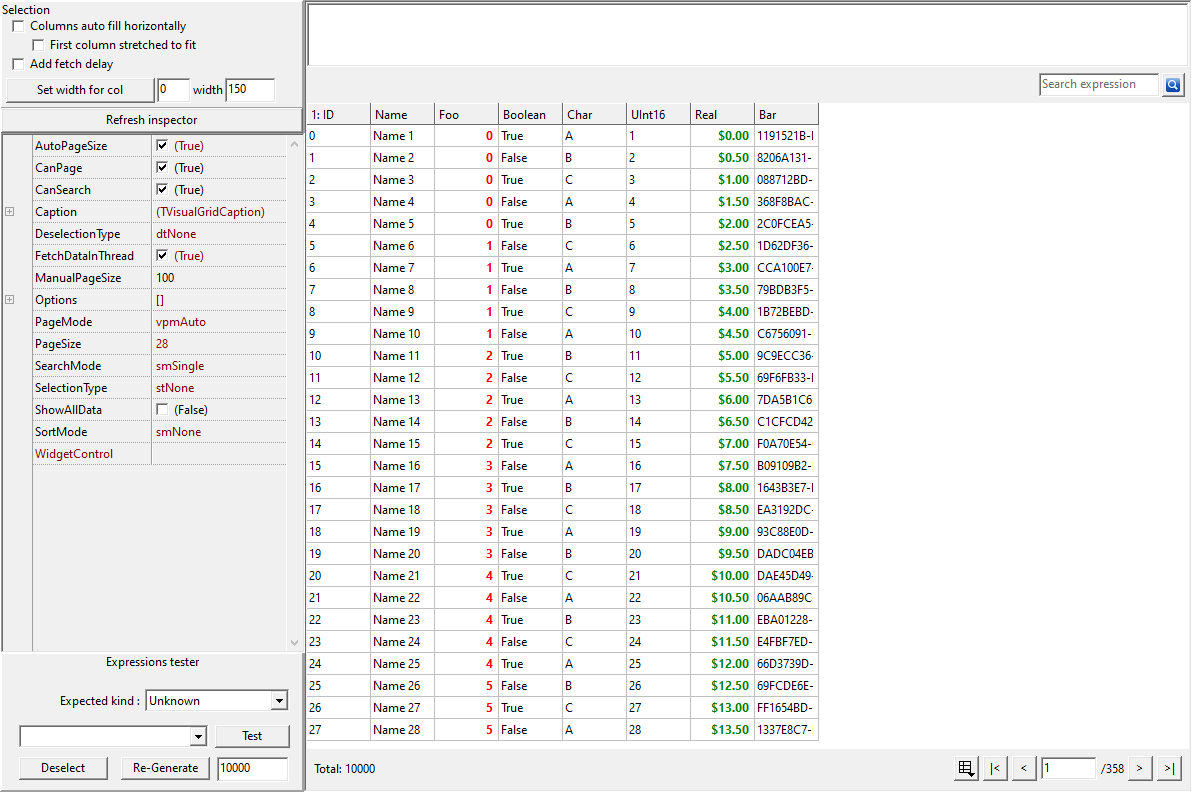
The screenshot shows the grid in the Framework's own Lazarus/LCL demonstration project.
5. What each environment still supplies
The source is shared, but the build artifacts are not.
-
Delphi. The package is
Sphere10Framework.dproj, a runtime package requiringrtl,vcl,vclxandvclimg. Without the package, addsrc/Sphere10to the unit search path and addUVisualGrid.VCL.rcto the project. Generics come from the Delphi RTL. -
Lazarus and Free Pascal. The package is
Sphere10Framework.lpk, requiring LCLBase and FCL. Without the package, addsrc/Sphere10to the unit search path. The generic collections are bundled with the package.
Compiled units, packages and form resources are specific to each compiler. Code that calls platform APIs directly, such as custom drawing or shell integration, also stays behind your own conditional or adapter.
6. What the sample was built and run on
The sample exercises all three page modes on a real LCL form, including a resize in vpmAuto.
vpmManual rows=25
vpmSingle rows=100
vpmAuto page size grew after the window was resized
7. Get the Framework and run the example
Get Sphere 10 Pascal Framework and follow its package instructions , which describe the Delphi and Lazarus arrangements summarised above.
The sample was compiled and run on Windows with Free Pascal 3.2.0 and the Lazarus Win32 widgetset, against
source revision
2cc6558
. Its Build.ps1 accepts the Framework, compiler, Lazarus and output paths.
Download the complete runnable sample.
For the broader Sphere 10 development toolkit, see the Sphere10 Framework overview .
Author: Herman Schoenfeld
